I tried to install and run the flatpak build on a clean Ubuntu 24. It worked - to my surprise even in a Virtualbox VM. Do not talk about peeformance.
The intent was to find out how I can detect the installation and run it. So far it seems this is easiest running 'flatpak list' and 'flatpak run' commands.
But where do savegames and expansions get stored? And if need be, how are these directories defined from outside? I heard Oolite would respect environment variables...
I'd like to see the same questions answered for appimage and msix...
Detect and run modern installations
Moderators: another_commander, winston
-
hiran

- Theorethicist
- Posts: 2573
- Joined: Fri Mar 26, 2021 1:39 pm
- Location: a parallel world I created for myself. Some call it a singularity...
Detect and run modern installations
Sunshine - Moonlight - Good Times - Oolite


Re: Detect and run modern installations
The locations and variables are documented here: https://oolite.readthedocs.io/en/latest/#game-datahiran wrote: ↑Wed Feb 18, 2026 1:05 pmI tried to install and run the flatpak build on a clean Ubuntu 24. It worked - to my surprise even in a Virtualbox VM. Do not talk about peeformance.
The intent was to find out how I can detect the installation and run it. So far it seems this is easiest running 'flatpak list' and 'flatpak run' commands.
But where do savegames and expansions get stored? And if need be, how are these directories defined from outside? I heard Oolite would respect environment variables...
I'd like to see the same questions answered for appimage and msix...
However, the msix location is missing. another_commander can confirm - not sure if this is the latest info. The msix has restrictions on what folders the game can access.
The Linux versions run a script. This sets up the environment variables according to what's written in the readthedocs. Those variables can be set by the user or apps like OoliteStarter. Flatpaks are forbidden to access folders outside of
~/.var/app/space.oolite.Oolite/, but you can make other folders in there and assign the variables to them. Appimages have no restrictions.Although the Windows versions do not have a startup script to configure environment variables, most of the folders can still be changed by setting variables as they are in the ObjC not the script, although another_commander wondered if changing these might affect Windows specific features like reshade as I recall. Hence, the Windows builds use their own defaults with no environment variables set out of the box. Assuming the environment variables work fine on Windows, they may be enough to achieve what you want rather than having to copy folders or files around.
The variables that can be used by the game executable because they are in the ObjC code are:
OO_SAVEDIR (saved games folder)
OO_SNAPSHOTSDIR (where snapshots taken while playing go)
OO_LOGSDIR (logs folder)
OO_MANAGEDADDONSDIR (managed addons folder)
OO_ADDONSEXTRACTDIR (main user addons directory where snapshots of OXPs go (when you press X in expansion manager) )
OO_ADDITIONALADDONSDIRS (comma separated list of other folders to look in for addons)
-
another_commander
- Quite Grand Sub-Admiral

- Posts: 7178
- Joined: Wed Feb 28, 2007 7:54 am
Re: Detect and run modern installations
My turn I guess. Get coffee - this is going to be long.
The latest information regarding the Windows MS Store Package is here. But before proceeding further, I'd like to clear up a potential misunderstanding regarding terminology as far as this particular MS Store variant of Oolite is concerned.
I read a lot "MSIX this" and "MSIX that" in the forum, but the reality is that MSIX is just the final binary installer format that was submitted to Microsoft. From that moment on, there is no MSIX anywhere to be seen and end-users will never see an MSIX file on their computers if they follow the standard MS Store channels for installing the game. The way it wprks is, one can get Oolite from the Store in two ways: either from the MS Store app interface in Windows, or from the apps.microsoft.com site, i.e. the web-page Store flavor. If they use the Store app interface, they search for Oolite, click on the "Get" button once the game is found and the msstore performs an almost silent remote install of the package. In the second case they find Oolite, click on the "Download" button and the web-page downloads a 1MB, Microsoft-signed web installer executable named "Oolite Installer.exe", which they then click to perform the installation. The executable instaler connects to the msstore servers and pulls the package contents while showing a minimal progress dialog to the user. That's it. Although it is indeed an MSIX that is served by Microsoft to the users, no MSIX is seen anywhere as far as the end-user is concerned. In both cases above the installation process includes the download and installation of msstore licensing data for the game. This is required even for free apps like Oolite. The license installation process is effectively a black box with next to no documentation available, but as far as I could research it, it involves encryption and an arcane registry key with a GUID as its name, so good luck looking for it.
Now, it is entirely possible to download the actual MSIX served by the msstore when installing the Oolite package and that can be done via third party sites like https://store.rg-adguard.net/ . You go to that site, enter Oolite's store ID (9NBHLS7XQL21), select the "Retail" channel for download and the site will offer you a link to download the MSIX which is signed by Microsoft and is used in the msstore transactions for delivering Oolite to users. You can inspect the file, open it with Winzip or 7zip or whatever and look at its structure, manifest and everything else you like. You can even install it successfully, but that's where it ends. You cannot run the game if you just install from the downloaded MSIX because you will be missing the license data. If you do try to run it you will receive a blue OS dialog with a message about a problem with your msstore account and the OS will refuse to launch the game.
So, since the term MSIX is not something end-users are expected to experience under normal circumstances, I prefer to use the term MS Store Package (MSSP for brevity) when referring to the actual game data (binaries plus resources) that end up on users' SSDs as the result of an msstore installation. With that sorted, let's get to actual answers:
- How to detect the installation: You don't have to. The MSSP will set up an application execution alias for Oolite. This is a zero-bytes-size reparse point located in a folder which is always part of the PATH environment variable in all Windows installations and it points to the actual location of the Oolite's executable. This means that you can run Oolite simply by calling "oolite.exe" without any path components from anywhere you want. For completeness' sake the actual installation path for the MSSP is
- Location of files: AddOns, logs, user defaults files, game caches, saved games and sreenshots of the MS Store flavor are all saved in the path
- Can you define other folders for output?: For that I am not entirely sure. I have tested the package with modified folders for saving to MyDocuments and it worked but I am not sure if you can set any folder you like as generated files location. Maybe there are restrictions imposed by the MSSP runtime and only folders under C:\Users\[username] are allowed. I have not tested this scenario extensively and will have to research MS documentation a bit more thoroughly. Regarding setting up environment variables, although I generally prefer to have Oolite launched from its main executable, it should be no problem to set up a batch file which sets up environment vars as needed and launches Oolite. It's just that if you do this, then other utilities like Reshade or SpecialK which are used to inject gfx effects or performance monitoring utilities cannot be used. Windows gamers often like to use such things. But technically, yes you can set up a batch file launch and it should work in pretty much the same way as mcarans has described in the previous post for scripts.
The latest information regarding the Windows MS Store Package is here. But before proceeding further, I'd like to clear up a potential misunderstanding regarding terminology as far as this particular MS Store variant of Oolite is concerned.
I read a lot "MSIX this" and "MSIX that" in the forum, but the reality is that MSIX is just the final binary installer format that was submitted to Microsoft. From that moment on, there is no MSIX anywhere to be seen and end-users will never see an MSIX file on their computers if they follow the standard MS Store channels for installing the game. The way it wprks is, one can get Oolite from the Store in two ways: either from the MS Store app interface in Windows, or from the apps.microsoft.com site, i.e. the web-page Store flavor. If they use the Store app interface, they search for Oolite, click on the "Get" button once the game is found and the msstore performs an almost silent remote install of the package. In the second case they find Oolite, click on the "Download" button and the web-page downloads a 1MB, Microsoft-signed web installer executable named "Oolite Installer.exe", which they then click to perform the installation. The executable instaler connects to the msstore servers and pulls the package contents while showing a minimal progress dialog to the user. That's it. Although it is indeed an MSIX that is served by Microsoft to the users, no MSIX is seen anywhere as far as the end-user is concerned. In both cases above the installation process includes the download and installation of msstore licensing data for the game. This is required even for free apps like Oolite. The license installation process is effectively a black box with next to no documentation available, but as far as I could research it, it involves encryption and an arcane registry key with a GUID as its name, so good luck looking for it.
Now, it is entirely possible to download the actual MSIX served by the msstore when installing the Oolite package and that can be done via third party sites like https://store.rg-adguard.net/ . You go to that site, enter Oolite's store ID (9NBHLS7XQL21), select the "Retail" channel for download and the site will offer you a link to download the MSIX which is signed by Microsoft and is used in the msstore transactions for delivering Oolite to users. You can inspect the file, open it with Winzip or 7zip or whatever and look at its structure, manifest and everything else you like. You can even install it successfully, but that's where it ends. You cannot run the game if you just install from the downloaded MSIX because you will be missing the license data. If you do try to run it you will receive a blue OS dialog with a message about a problem with your msstore account and the OS will refuse to launch the game.
So, since the term MSIX is not something end-users are expected to experience under normal circumstances, I prefer to use the term MS Store Package (MSSP for brevity) when referring to the actual game data (binaries plus resources) that end up on users' SSDs as the result of an msstore installation. With that sorted, let's get to actual answers:
- How to detect the installation: You don't have to. The MSSP will set up an application execution alias for Oolite. This is a zero-bytes-size reparse point located in a folder which is always part of the PATH environment variable in all Windows installations and it points to the actual location of the Oolite's executable. This means that you can run Oolite simply by calling "oolite.exe" without any path components from anywhere you want. For completeness' sake the actual installation path for the MSSP is
C:\Program Files\WindowsApps\OoliteDevTeam.Oolite_1.92.0.0_x64__x4yhmcdj37sz2\VFS\AppVPackageDrive\Oolite and the reparse point location is C:\Users\[username]\AppData\Local\Microsoft\WindowsApps\oolite.exe. Note that the MSSP install location is an extremely tightly OS-protected folder where only read operations are allowed. It is strongly recommended to not do anything there and not accessing it at all would be a very good idea indeed.- Location of files: AddOns, logs, user defaults files, game caches, saved games and sreenshots of the MS Store flavor are all saved in the path
C:\Users\<username>\AppData\Local\Packages\OoliteDevTeam.Oolite_x4yhmcdj37sz2\LocalCache\Local\Oolite unless the path C:\Users\<username>\AppData\Local\Oolite already exists. If this exists, then all generated files are saved there. If not, they are redirceted to the former path. The folder structure under any of those paths is the same as usual (e.g. Logs under oolite.app, savefiles under oolite.app/oolite-saves, expansions under Oolite/AddOns etc.).- Can you define other folders for output?: For that I am not entirely sure. I have tested the package with modified folders for saving to MyDocuments and it worked but I am not sure if you can set any folder you like as generated files location. Maybe there are restrictions imposed by the MSSP runtime and only folders under C:\Users\[username] are allowed. I have not tested this scenario extensively and will have to research MS documentation a bit more thoroughly. Regarding setting up environment variables, although I generally prefer to have Oolite launched from its main executable, it should be no problem to set up a batch file which sets up environment vars as needed and launches Oolite. It's just that if you do this, then other utilities like Reshade or SpecialK which are used to inject gfx effects or performance monitoring utilities cannot be used. Windows gamers often like to use such things. But technically, yes you can set up a batch file launch and it should work in pretty much the same way as mcarans has described in the previous post for scripts.
-
hiran
- Theorethicist
- Posts: 2573
- Joined: Fri Mar 26, 2021 1:39 pm
- Location: a parallel world I created for myself. Some call it a singularity...
Re: Detect and run modern installations
Thank you both for the good explanations. I'll have to experiment a bit now.
On Linux the three different installation types are already detected. Registering the configuration and running Oolite is still pending.
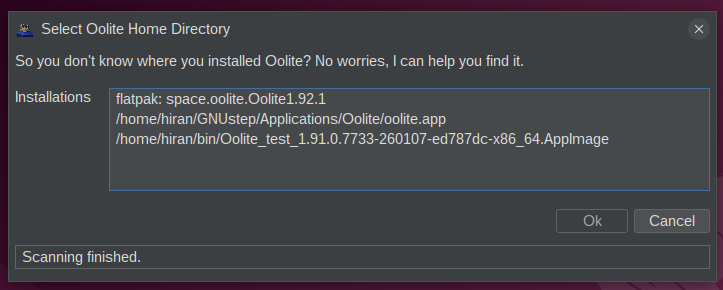
For Windows it will also matter whether Oolite is installed via the store. Plus, nothing would prevent a user from running the NSIS installer in parallel. Maybe even multiple times with different versions into different directories?
On Linux the three different installation types are already detected. Registering the configuration and running Oolite is still pending.
For Windows it will also matter whether Oolite is installed via the store. Plus, nothing would prevent a user from running the NSIS installer in parallel. Maybe even multiple times with different versions into different directories?
Sunshine - Moonlight - Good Times - Oolite
Re: Detect and run modern installations
You're welcome! Yes NSIS (including different versions) can be installed to multiple folders. Similarly, same or different appimage versions can be copied to and run from multiple folders. (I hope I make sense. I just had a wisdom tooth removed under sedation)hiran wrote: ↑Thu Feb 19, 2026 9:23 pmThank you both for the good explanations. I'll have to experiment a bit now.
On Linux the three different installation types are already detected. Registering the configuration and running Oolite is still pending.
For Windows it will also matter whether Oolite is installed via the store. Plus, nothing would prevent a user from running the NSIS installer in parallel. Maybe even multiple times with different versions into different directories?
-
hiran
- Theorethicist
- Posts: 2573
- Joined: Fri Mar 26, 2021 1:39 pm
- Location: a parallel world I created for myself. Some call it a singularity...
Re: Detect and run modern installations
Is there some way to find out the version numbers of Oolite? I used to go to the resources folder to lookup manifest.plist - which is no longer possible on .AppImage and FlatPak.
Ah, and for similar reasons it would be good to know whether the distribution can work with the debug console or not.
I did mention at some time it would be great to run the application using --version and read stdout. Now I know why...
Last yet not least: How can I pass command line arguments to the flatpak build? I intend to use "-load <savegame>" to resume but it seems to get ignored, unlike with classic and .AppImage distributions.
Ah, and for similar reasons it would be good to know whether the distribution can work with the debug console or not.
I did mention at some time it would be great to run the application using --version and read stdout. Now I know why...
Last yet not least: How can I pass command line arguments to the flatpak build? I intend to use "-load <savegame>" to resume but it seems to get ignored, unlike with classic and .AppImage distributions.
Sunshine - Moonlight - Good Times - Oolite
Re: Detect and run modern installations
Resources is still available:hiran wrote: ↑Fri Feb 20, 2026 9:44 pmIs there some way to find out the version numbers of Oolite? I used to go to the resources folder to lookup manifest.plist - which is no longer possible on .AppImage and FlatPak.
Ah, and for similar reasons it would be good to know whether the distribution can work with the debug console or not.
I did mention at some time it would be great to run the application using --version and read stdout. Now I know why...
Last yet not least: How can I pass command line arguments to the flatpak build? I intend to use "-load <savegame>" to resume but it seems to get ignored, unlike with classic and .AppImage distributions.
Code: Select all
flatpak run --command=ls space.oolite.Oolite /app/bin/ResourcesCode: Select all
flatpak run --command=cat space.oolite.Oolite /app/bin/Resources/manifest.plist
Code: Select all
./appimage-name.AppImage --appimage-extract
cat squashfs-root/usr/bin/Resources/manifest.plist
AI claims you can do it in one but you may need to install an additional tool:
Code: Select all
# This prints the contents of the file directly to your terminal
unsquashfs -p 1 -cat your-app.AppImage path/to/file/inside/image
To pass env vars to flatpak you can do this:
flatpak run --env=OO_SAVEDIR=$HOME/.var/app/space.oolite.Oolite/AltSavedGames space.oolite.OoliteYou can add
-load and give full path to load eg:
Code: Select all
flatpak run space.oolite.Oolite -load $HOME/.var/app/space.oolite.Oolite/SavedGames/Jamesontest2.oolite-save-
another_commander
- Quite Grand Sub-Admiral
- Posts: 7178
- Joined: Wed Feb 28, 2007 7:54 am
Re: Detect and run modern installations
Just quickly noting here that in 1.92 -load is optional. You can just pass the file path of the savegame and it will be loaded.
-
hiran
- Theorethicist
- Posts: 2573
- Joined: Fri Mar 26, 2021 1:39 pm
- Location: a parallel world I created for myself. Some call it a singularity...
Re: Detect and run modern installations
Oh, this is great. Already coded for the next version.mcarans wrote: ↑Sat Feb 21, 2026 3:51 amResources is still available:You can cat things in there:Code: Select all
flatpak run --command=ls space.oolite.Oolite /app/bin/ResourcesCode: Select all
flatpak run --command=cat space.oolite.Oolite /app/bin/Resources/manifest.plist

I have no luck so far. Does this really work or is it a good guess? I do not want to depend on additional tools hence I tried this:mcarans wrote: ↑Sat Feb 21, 2026 3:51 amFor appimage you can use the version in the filename or extract it:Code: Select all
./appimage-name.AppImage --appimage-extract
cat squashfs-root/usr/bin/Resources/manifest.plist
AI claims you can do it in one but you may need to install an additional tool:Code: Select all
# This prints the contents of the file directly to your terminal
unsquashfs -p 1 -cat your-app.AppImage path/to/file/inside/image
Code: Select all
$ ./Oolite_test_1.91.0.7733-260107-ed787dc-x86_64.AppImage --appimage-extract cat squashfs-root/usr/bin/Resources/manifest.plist
Unexpected argument count: 3
Usage: ./Oolite_test_1.91.0.7733-260107-ed787dc-x86_64.AppImage --appimage-extract [<prefix>]
$
Confirmed, that one works. But my command does not. "-nosplash" seems to break everything. Looks like a bug to me.mcarans wrote: ↑Sat Feb 21, 2026 3:51 amYou can add-loadand give full path to load eg:Code: Select all
flatpak run space.oolite.Oolite -load $HOME/.var/app/space.oolite.Oolite/SavedGames/Jamesontest2.oolite-save
Code: Select all
flatpak run space.oolite.Oolite -load /home/hiran/.var/app/space.oolite.Oolite/SavedGames/murkia.oolite-save -nospashSunshine - Moonlight - Good Times - Oolite
-
hiran
- Theorethicist
- Posts: 2573
- Joined: Fri Mar 26, 2021 1:39 pm
- Location: a parallel world I created for myself. Some call it a singularity...
Re: Detect and run modern installations
Yes, on the flatpak I can strip off the -load, but -nosplash also breaks everything. Still looks like a bug to me.another_commander wrote: ↑Sat Feb 21, 2026 8:52 amJust quickly noting here that in 1.92 -load is optional. You can just pass the file path of the savegame and it will be loaded.
Sunshine - Moonlight - Good Times - Oolite
-
another_commander
- Quite Grand Sub-Admiral
- Posts: 7178
- Joined: Wed Feb 28, 2007 7:54 am
-
another_commander
- Quite Grand Sub-Admiral
- Posts: 7178
- Joined: Wed Feb 28, 2007 7:54 am
Re: Detect and run modern installations
There was indeed a bug in 1.92 (and 1.93). The savefile passed as argument in the command line would not load unless it was the last argument in the list. If you had entered the command
it would have worked, but
would fail to load the save file.
All this should be fixed now both for 1.92-maintenance and 1.93. Can you please check and confirm?
Code: Select all
flatpak run space.oolite.Oolite -nosplash -load /home/hiran/.var/app/space.oolite.Oolite/SavedGames/murkia.oolite-saveCode: Select all
flatpak run space.oolite.Oolite -load /home/hiran/.var/app/space.oolite.Oolite/SavedGames/murkia.oolite-save -nosplashAll this should be fixed now both for 1.92-maintenance and 1.93. Can you please check and confirm?
-
hiran
- Theorethicist
- Posts: 2573
- Joined: Fri Mar 26, 2021 1:39 pm
- Location: a parallel world I created for myself. Some call it a singularity...
Re: Detect and run modern installations
Wooohoo! Sounds like progress. Although...another_commander wrote: ↑Sat Feb 21, 2026 7:14 pmThere was indeed a bug in 1.92 (and 1.93). The savefile passed as argument in the command line would not load unless it was the last argument in the list. If you had entered the commandit would have worked, butCode: Select all
flatpak run space.oolite.Oolite -nosplash -load /home/hiran/.var/app/space.oolite.Oolite/SavedGames/murkia.oolite-savewould fail to load the save file.Code: Select all
flatpak run space.oolite.Oolite -load /home/hiran/.var/app/space.oolite.Oolite/SavedGames/murkia.oolite-save -nosplash
All this should be fixed now both for 1.92-maintenance and 1.93. Can you please check and confirm?
I can confirm regardless what you write after the filename disqualifies the file loading. Making -load optional actually moved the option out of options into the list of arguments (on Unix systems a lot of command make a difference here). Just as you describe, options precede arguments. It looks like Oolite interprets all arguments as one filename and does not even complain if something cannot be loaded. It should get fixed or updated in the documentation.
For me it is now easier to switch the arguments in OoliteStarter and the problem is history.
Sunshine - Moonlight - Good Times - Oolite
Re: Detect and run modern installations
The extract worked for me. Make sure you issue 2 commands - extract then cat:hiran wrote: ↑Sat Feb 21, 2026 4:54 pmI have no luck so far. Does this really work or is it a good guess? I do not want to depend on additional tools hence I tried this:mcarans wrote: ↑Sat Feb 21, 2026 3:51 amFor appimage you can use the version in the filename or extract it:Code: Select all
./appimage-name.AppImage --appimage-extract
cat squashfs-root/usr/bin/Resources/manifest.plist
Code: Select all
$ ./Oolite_test_1.91.0.7733-260107-ed787dc-x86_64.AppImage --appimage-extract cat squashfs-root/usr/bin/Resources/manifest.plist
Unexpected argument count: 3
Usage: ./Oolite_test_1.91.0.7733-260107-ed787dc-x86_64.AppImage --appimage-extract [<prefix>]
$
Code: Select all
> ./Oolite_1.93.0.7774-260215-82f9ce6-x86_64.appimage --appimage-extract
mcarans@Holly [~/Downloads] ○                                                                                                                                                                                            [py-'python'] [09:37:12]
> cat squashfs-root/usr/bin/Resources/manifest.plist
{
        title = "Oolite core";
        identifier = "org.oolite.oolite";

        version = "1.93";
        required_oolite_version = "1.93";

        license = "GPL 2+ / CC-BY-NC-SA 3.0 - see LICENSE.md for details";
        author = "Giles Williams, Jens Ayton and contributors";
        information_url = "https://oolite.space/";
}
-
hiran
- Theorethicist
- Posts: 2573
- Joined: Fri Mar 26, 2021 1:39 pm
- Location: a parallel world I created for myself. Some call it a singularity...
Re: Detect and run modern installations
Ok, that explains. This way I get the full appimage extracted - it takes more than 200 MB disk space just to find the version number. I hope we can improve on that.
But it could answer the next question I was going to shoot: Where would I find the developer version's debug.oxp?
Sunshine - Moonlight - Good Times - Oolite