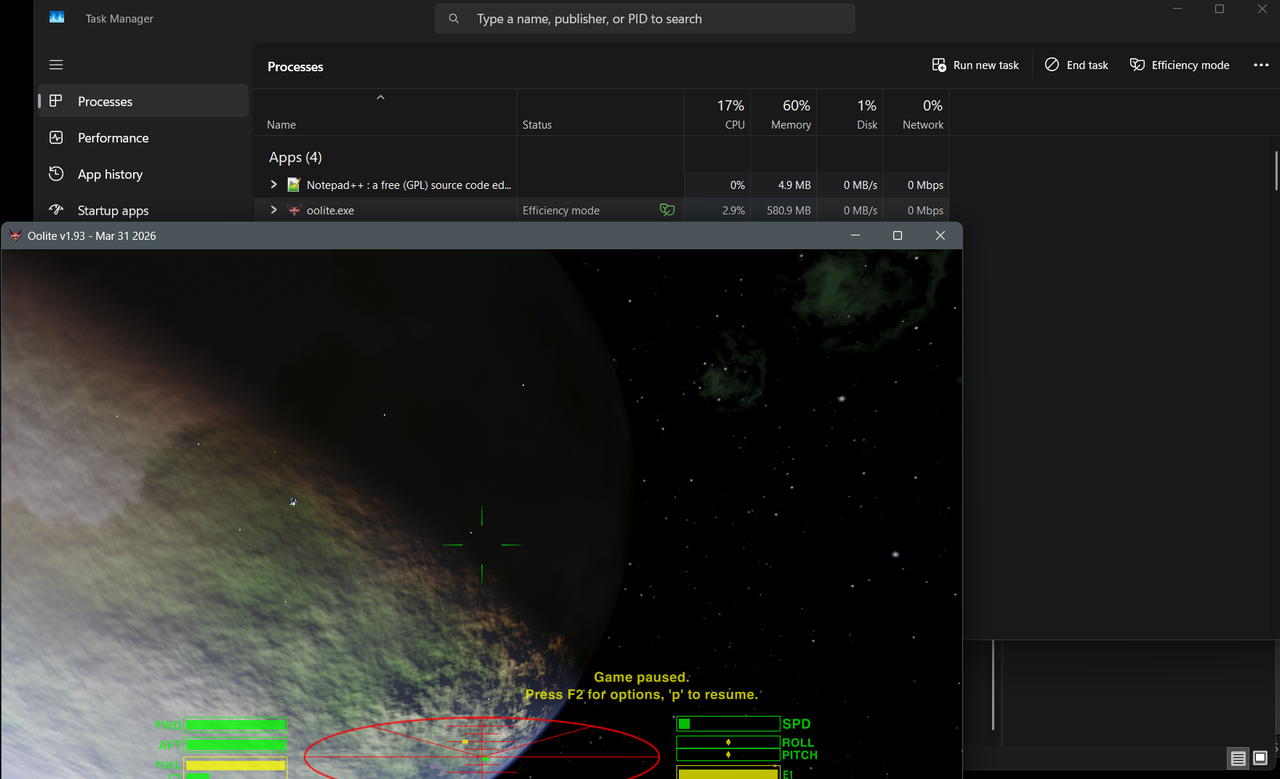
EcoQoS is a quality of service level in Windows that allows apps to opt-in for low power consumption modes. Oolite can use it when it is not in focus or when it is paused, since we don't need the full processing power of the CPU if the game is not under direct player control. It can be extremely helpful with battery consumption on laptops and should overall result in greater efficiency and system responsiveness.
When active, EcoQoS schedules the game for running on more efficient, low-power CPU cores and the CPU is also throttled to a more efficient operating frequency. That allows for less power requirements and higher responsiveness of other applications that might have the focus when EcoQoS is active.
EcoQoS can be controlled via user preference by setting the OoliteDefaults.plist key ecoqos to either YES or NO. Default is YES and setting it to NO will result in the game behaving as it has been until now (no efficient power usage).
If you run Task Manager next to Oolite you can see it utilizing EcoQoS as seen below. Look at the "Efficiency mode" label and the green leaf icon next to the oolite.exe process - this is because the game is paused in this screenshot. The greyed out numbers indicate that the core running Oolite is currently throttling to conserve energy.