

The process to have Oolite on the Microsoft store seems straightforward enough according to AI:
"The primary tool used for this is the Microsoft MSIX Packaging Tool.
Preparation: You must set up a clean, dedicated virtual machine (VM) for the conversion to ensure the resulting package is clean and doesn't contain extraneous data from the host machine.
Monitoring: You launch the MSIX Packaging Tool on the VM and instruct it to start monitoring the system.
Installation: You run the NSIS EXE installer (your application's setup) on the VM. The tool captures all the file, registry, and configuration changes made by the installer.
Completion: Once the NSIS installation finishes, you stop the monitoring process. The MSIX Packaging Tool then uses the captured changes to create the final MSIX package file.
Digital Signing: The generated MSIX package must be digitally signed with a trusted certificate before it can be installed or submitted to the Microsoft Store."
Could this be a way to get the game more widely known on Windows?
Submit Oolite to the Microsoft Store
Moderators: another_commander, winston
-
another_commander
- Quite Grand Sub-Admiral

- Posts: 7173
- Joined: Wed Feb 28, 2007 7:54 am
Re: Submit Oolite to the Microsoft Store
I had a look at this in the past and this last part is the hard one. Most certification authorities will require a fee for providing their service, but thankfully there are a few like SignPath that offer it for free for open source projects. However, the vetting process for acquiring a trusted certificate is complex and requires submission of personal official identification information like ID or driver's license to the vetting organization in all cases.
To get a code signing certificate we will need someone who is a member of the project and who is willing to undergo the vetting process of whichever certification authority is selected. Only then will we be able to create an MSIX installer (the signing certificate must be already available to use when the installer is created).
Re: Submit Oolite to the Microsoft Store
It turns out you only need a certificate for an unpack aged app eg. exe or msi file. If you generate an MSIX package, you don't need one.another_commander wrote: ↑Mon Dec 08, 2025 4:59 amI had a look at this in the past and this last part is the hard one. Most certification authorities will require a fee for providing their service, but thankfully there are a few like SignPath that offer it for free for open source projects. However, the vetting process for acquiring a trusted certificate is complex and requires submission of personal official identification information like ID or driver's license to the vetting organization in all cases.
To get a code signing certificate we will need someone who is a member of the project and who is willing to undergo the vetting process of whichever certification authority is selected. Only then will we be able to create an MSIX installer (the signing certificate must be already available to use when the installer is created).
" For Packaged Apps (MSIX/AppX): When you submit a packaged app through the Partner Center, Microsoft automatically signs the package with its own trusted certificate as part of the app certification process.
For Unpackaged Apps (MSI/EXE Installers): If you submit a link to an existing traditional installer (.exe or .msi), that specific installer file must be pre-signed with a code signing certificate from a Certificate Authority (CA) that is part of the Microsoft Trusted Root Program. "
-
another_commander
- Quite Grand Sub-Admiral
- Posts: 7173
- Joined: Wed Feb 28, 2007 7:54 am
Re: Submit Oolite to the Microsoft Store
To generate an MSIX you need the certificate. It's part of the installer creation process. At least that's how I understand it. No certificate -> no MSIX.
Edit: Turns out there is an option to "sign later" during the creation process. The generated MSIX cannot be installed on any machine until it has been signed.
https://learn.microsoft.com/en-us/windo ... pp-package - look for "Signing Preference".
Edit: Turns out there is an option to "sign later" during the creation process. The generated MSIX cannot be installed on any machine until it has been signed.
https://learn.microsoft.com/en-us/windo ... pp-package - look for "Signing Preference".
-
another_commander
- Quite Grand Sub-Admiral
- Posts: 7173
- Joined: Wed Feb 28, 2007 7:54 am
Re: Submit Oolite to the Microsoft Store
OK so if MSIX signing can be handled by Microsoft things get a lot simpler, yet not exactly smooth. Some thoughts below.
You can most likely create an unsigned MSIX but you will have to test it somewhere before submitting to MS. Since the installer cannot be run on any machine unless signed, the only option I see here is to create it with a self-signed certificate first (which will work only on your machine because you need to install your self-generated cert into your computer's Certificate Store in the Root CA area), perform your tests and, if happy, submit to MS an exact unsigned copy of the MSIX to proceed. Doable, but a bit of an inconvenience. Anyway, for now let's keep the doable part in our head,
Then there is the question of what to submit. 1.90 is extremely old at this stage and IMO not representative of the years of development following it. We'll need something more recent. Possibly even a Clang build for maximum performance. So, do we need to consider a new release before any submissions to the MS Store? If we say yes to that, is Linux ready for a new release? It wouldn't be great if we only made a new release on Windows. Need to plan for that. Another issue with 1.90 from what I've seen on the available MS information is that if you have installers of a product floating around the net that are the same as the product you are trying to publish in the store, you will encounter issues during the certification process if you don't remove them first. Need to check on that too.
And you need to create an account on the MS Partner Center. This is probably the easiest task and it seems it's free for projects like Oolite but the publishing process does seem a bit laborious.
You can most likely create an unsigned MSIX but you will have to test it somewhere before submitting to MS. Since the installer cannot be run on any machine unless signed, the only option I see here is to create it with a self-signed certificate first (which will work only on your machine because you need to install your self-generated cert into your computer's Certificate Store in the Root CA area), perform your tests and, if happy, submit to MS an exact unsigned copy of the MSIX to proceed. Doable, but a bit of an inconvenience. Anyway, for now let's keep the doable part in our head,
Then there is the question of what to submit. 1.90 is extremely old at this stage and IMO not representative of the years of development following it. We'll need something more recent. Possibly even a Clang build for maximum performance. So, do we need to consider a new release before any submissions to the MS Store? If we say yes to that, is Linux ready for a new release? It wouldn't be great if we only made a new release on Windows. Need to plan for that. Another issue with 1.90 from what I've seen on the available MS information is that if you have installers of a product floating around the net that are the same as the product you are trying to publish in the store, you will encounter issues during the certification process if you don't remove them first. Need to check on that too.
And you need to create an account on the MS Partner Center. This is probably the easiest task and it seems it's free for projects like Oolite but the publishing process does seem a bit laborious.
Re: Submit Oolite to the Microsoft Store
Yes a release would only make sense of the modernised version and in conjunction with getting Linux up to date. I think that MS may check the package and newer dlls are I would imagine more likely to pass.another_commander wrote: ↑Mon Dec 08, 2025 8:55 amOK so if MSIX signing can be handled by Microsoft things get a lot simpler, yet not exactly smooth. Some thoughts below.
You can most likely create an unsigned MSIX but you will have to test it somewhere before submitting to MS. Since the installer cannot be run on any machine unless signed, the only option I see here is to create it with a self-signed certificate first (which will work only on your machine because you need to install your self-generated cert into your computer's Certificate Store in the Root CA area), perform your tests and, if happy, submit to MS an exact unsigned copy of the MSIX to proceed. Doable, but a bit of an inconvenience. Anyway, for now let's keep the doable part in our head,
Then there is the question of what to submit. 1.90 is extremely old at this stage and IMO not representative of the years of development following it. We'll need something more recent. Possibly even a Clang build for maximum performance. So, do we need to consider a new release before any submissions to the MS Store? If we say yes to that, is Linux ready for a new release? It wouldn't be great if we only made a new release on Windows. Need to plan for that. Another issue with 1.90 from what I've seen on the available MS information is that if you have installers of a product floating around the net that are the same as the product you are trying to publish in the store, you will encounter issues during the certification process if you don't remove them first. Need to check on that too.
And you need to create an account on the MS Partner Center. This is probably the easiest task and it seems it's free for projects like Oolite but the publishing process does seem a bit laborious.
Regarding the JavaScript library, on Linux it is statically linked while on Windows, it is a DLL - why is that? Despite its age, it was relatively easy to configure and build on Linux, the main pain being having to build Python 2.7 from source. I was wondering if tit is easier because it is statically linked and if the challenges on Windows are because it is a DLL ie. if Windows used static linking as well, would the JS would require less or no Windows specific customisations? The reason I ask here is that if MS do checks, the JS dll might be something they flag.

Re: Submit Oolite to the Microsoft Store
Have you tried pyenv? I found that to be quite a simple way to have 2.7, and flip versions on a whim. Cross platform too.
https://pyenv.net/
-
another_commander
- Quite Grand Sub-Admiral
- Posts: 7173
- Joined: Wed Feb 28, 2007 7:54 am
Re: Submit Oolite to the Microsoft Store
Static or dynamic js linking in Windows would bear the same effort. The problem with spidermonkey was that it was designed to be built with MSVC. Getting it to build on MinGW was the ultimate objective and a static build would still need all the tweaks that I had to do. On Windows we stayed with the dll because it worked and since the previous spidermonkey we had was also a dll I did not give it much further thought. For Linux I am not sure why static linking was chosen, maybe it was the easier option?mcarans wrote: ↑Mon Dec 08, 2025 8:36 pmRegarding the JavaScript library, on Linux it is statically linked while on Windows, it is a DLL - why is that? Despite its age, it was relatively easy to configure and build on Linux, the main pain being having to build Python 2.7 from source. I was wondering if tit is easier because it is statically linked and if the challenges on Windows are because it is a DLL ie. if Windows used static linking as well, would the JS would require less or no Windows specific customisations? The reason I ask here is that if MS do checks, the JS dll might be something they flag.
Re: Submit Oolite to the Microsoft Store
I asked the AI about this and it said:another_commander wrote: ↑Mon Dec 08, 2025 8:55 amOK so if MSIX signing can be handled by Microsoft things get a lot simpler, yet not exactly smooth. Some thoughts below.
You can most likely create an unsigned MSIX but you will have to test it somewhere before submitting to MS. Since the installer cannot be run on any machine unless signed,
"No, the NSIS installer (the input file) does not need to be signed.
You can use an unsigned .exe created by NSIS with the MSIX Packaging Tool. Because the tool works by monitoring the installation process rather than analyzing the static binary, it simply treats your installer like any other executable running on the system.
However, there are important distinctions regarding signing in this process:
1. During the Capture Phase (Input)
No Blocking: The MSIX Packaging Tool will not block you from using an unsigned NSIS installer.
Security Prompts: During the capture phase, Windows may display a User Account Control (UAC) or SmartScreen warning stating that the app is from an "Unknown Publisher." You can simply accept/bypass this warning to proceed with the capture."
Hopefully it isn't hallucinating.
-
another_commander
- Quite Grand Sub-Admiral
- Posts: 7173
- Joined: Wed Feb 28, 2007 7:54 am
Re: Submit Oolite to the Microsoft Store
I know that you can use an unsigned NSIS installer with the MSIX Packaging Tool, what I meant was test the resulting MSIX somehow by running it and installing the game from the generated MSIX file. If you don't sign that, you cannot install it anywhere. So you will have to self-sign the MSIX just to be able to test that it works OK. Unless you skip this step completely and submit an untested MSIX to Microsoft for checking and signing.
-
another_commander
- Quite Grand Sub-Admiral
- Posts: 7173
- Joined: Wed Feb 28, 2007 7:54 am
Re: Submit Oolite to the Microsoft Store
And just to avoid any misunderstanding, self-signing does not require any third-party involvement. It's only valid for the machine you are using though, a self-created certificate should not be used in any other computer.
-
another_commander
- Quite Grand Sub-Admiral
- Posts: 7173
- Joined: Wed Feb 28, 2007 7:54 am
Re: Submit Oolite to the Microsoft Store
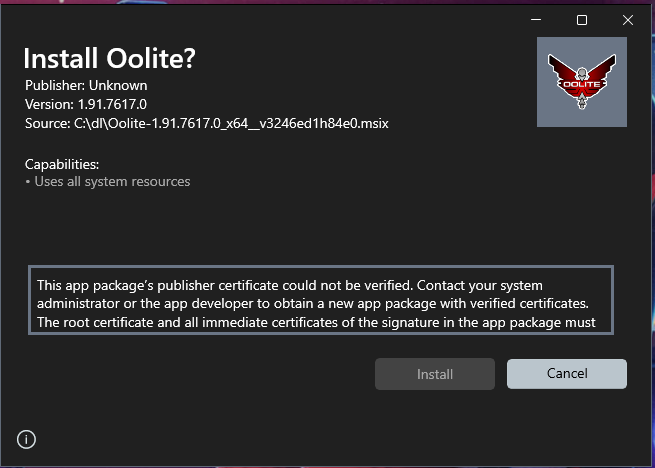
And here you go, the first test. Creating the MSIX was much easier than I thought, but cannot test because I do not have a certificate active. I'll see if I can find a VM or lab-rat computer to install a self-signed cert and see what the installer actually does.
-
another_commander
- Quite Grand Sub-Admiral
- Posts: 7173
- Joined: Wed Feb 28, 2007 7:54 am
Re: Submit Oolite to the Microsoft Store
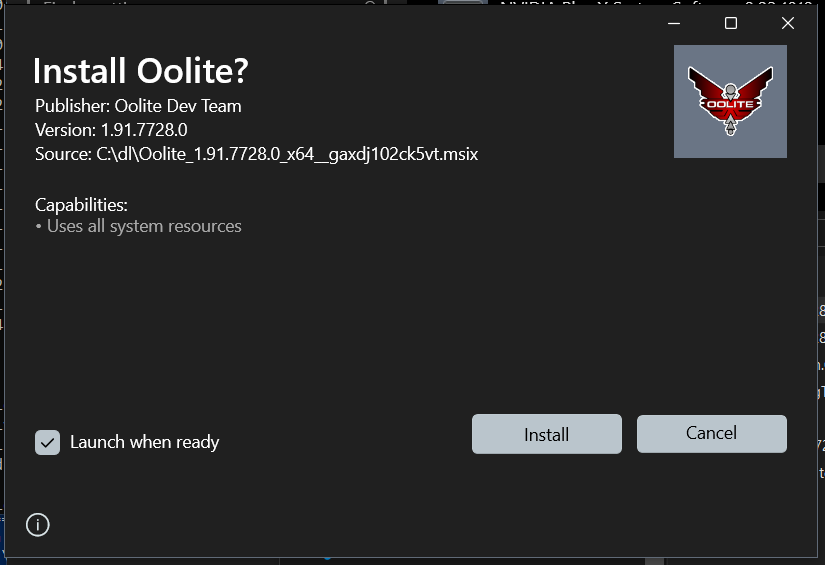
SUCCESS!
This is the MSIX installer ready to run on my test system. This has been signed with a self-signed certificate and works like a charm. The game is installed in a sandbox-like environment and plays just fine, with user created files redirected to the user's %LocalAppData%/Packages/... folder. However, getting to the manual AddOns folder is now trickier because one will have to drill down in the LocalAppData folder structure all the way to the Virtual File System created by the MSIX for the game. Uninstalling the game will remove every single trace of Oolite from the computer completely. So if you have OXPs and such downloaded, make sure to backup before you decide to uninstall.
Anyway, this works. I'm quite happy with it. I have uploaded the test MSIX installer here: https://drive.google.com/file/d/1sbpEGl ... sp=sharing . Be aware though, if you run this on your system you will not be able to install it because you will be missing the certificate necessary to validate the installer when it is run. Non-members of the Oolite dev team can stop reading here.
@Members of the dev team only: If you would like to test this, please PM me and I will provide you with the certificate file and instructions on how to install it on your system. Note that installing certificates from non-verified sources is inherently a security risk and it is recommended that you do NOT test on your primary systems. Use a VM if you can. If you do decide to use your main computer for this, at least ensure that after done testing you remove the test certificate from your system. Anyway, if anyone is interested let me know by PM.
-
another_commander
- Quite Grand Sub-Admiral
- Posts: 7173
- Joined: Wed Feb 28, 2007 7:54 am
Re: Submit Oolite to the Microsoft Store
Hope everyone had a great Christmas, best wishes for the new year coming up next.
I have created the image of the MSIX installer for Oolite which would have been a candidate for submission to the store if we were to release it today. The download link for the installer is here. You will need a special certificate to be able to run it, so for Dev Team members I can provide instructions by PM. All other readers of this post, sorry but I cannot provide self-signed certificates for widespread use, this could be a security risk for all.
The installer creates a fully sandboxed installation of Oolite inside
Application generated files are created inside
Two icons are generated in the Start menu.Oolite and Oolite-HDR. No other icons are installed to keep clutter down (not that anyone was using the extra icons anyway). It may be possible to add the Reference Sheet there too, but no promises at this time.
Finally, the installer creates an Application Execution Alias for Oolite, namely oolite.exe. What does this mean? It means that you can launch the game from anywhere, command shell, powershell, Windows+R Run dialog etc. just by typing
Uninstalling can be achieved by either going to Start->Settings->Apps->Installed Apps and clicking the three dots next to the Oolite entry as shown below.
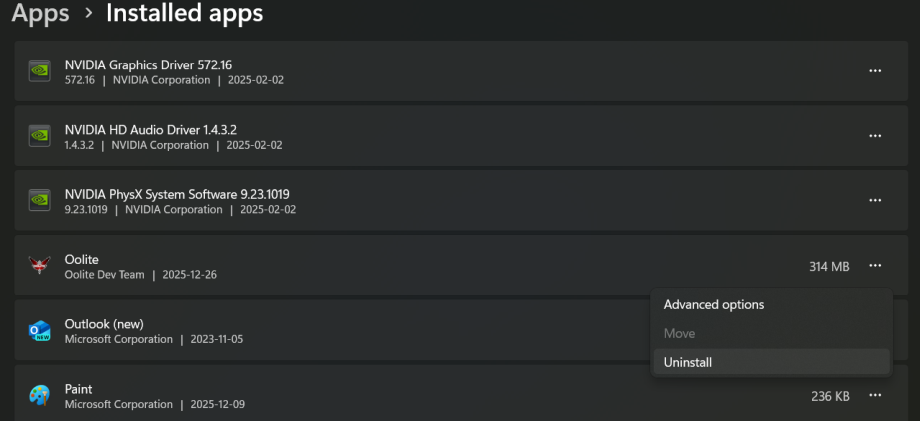
Alternatively you can right click on the game's Start menu shortcuts and select Uninstall from there. You are not meant to use the traditional Control Panel->Programs uninstall method. Uninstalling will leave your system in the exact same state it was before the initial installation.
This was quite a ride. The first MSIX was easy to create but configuring the
I have created the image of the MSIX installer for Oolite which would have been a candidate for submission to the store if we were to release it today. The download link for the installer is here. You will need a special certificate to be able to run it, so for Dev Team members I can provide instructions by PM. All other readers of this post, sorry but I cannot provide self-signed certificates for widespread use, this could be a security risk for all.
The installer creates a fully sandboxed installation of Oolite inside
C:\ProgramFiles\WindowsApps\[...], like any modern Windows application is meant to do. The sandbox is completely immune to external tamper and the files inside are guaranteed to be those intended by the creators of the app. The reason the above path is not complete is that you are not allowed to do anything inside it, not even view it, even if you are administrator. As soon as you try to enter WindowsApps you get a message from the OS denying you access. This is by design.Application generated files are created inside
%localappdata%\Packages\Oolite_gaxdj102ck5vt\LocalCache\Local\Oolite. This folder is user-accessible and you can find AddOns and oolite.app under it (will be created after running the game at least once), with the usual structure. OXPs and configurations can be adjusted inside this folder. Again, this is by design and due to the sandbox nature of the install. When you uninstall Oolite the entire package disappears from %localappdata% so make sure to backup anything you wish to keep before uninstalling because there are no confirmation messages or warnings, removal of the package is instant. If we wanted the program data to remain after uninstall (something which goes against the philosophy of sandboxed apps), we'd need to reconfigure the game's output to a folder like %userprofile%\OoliteData which is not virtualized by the MSIX package.Two icons are generated in the Start menu.Oolite and Oolite-HDR. No other icons are installed to keep clutter down (not that anyone was using the extra icons anyway). It may be possible to add the Reference Sheet there too, but no promises at this time.
Finally, the installer creates an Application Execution Alias for Oolite, namely oolite.exe. What does this mean? It means that you can launch the game from anywhere, command shell, powershell, Windows+R Run dialog etc. just by typing
oolite, pretty much the same way you can type notepad anywhere and start Notepad. This allows for running the game with any command line argument you may want.Uninstalling can be achieved by either going to Start->Settings->Apps->Installed Apps and clicking the three dots next to the Oolite entry as shown below.
Alternatively you can right click on the game's Start menu shortcuts and select Uninstall from there. You are not meant to use the traditional Control Panel->Programs uninstall method. Uninstalling will leave your system in the exact same state it was before the initial installation.
This was quite a ride. The first MSIX was easy to create but configuring the
%localappdata% variant presented me with quite a few challenges that required a lot of research to overcome. Hope this result is worth it.Re: Submit Oolite to the Microsoft Store
I am happy to say that it worked fine for me. Well done! I tested getting killed by Vipers, loading and saving a game, adding start choices OXP (which is easy to verify is working), moving said OXP from the ManagedAddOns to the AddOns folder and checking it is found there too, changing voices. I could see the created folder structure here:another_commander wrote: ↑Fri Dec 26, 2025 11:34 amHope everyone had a great Christmas, best wishes for the new year coming up next.
I have created the image of the MSIX installer for Oolite which would have been a candidate for submission to the store if we were to release it today. The download link for the installer is here. You will need a special certificate to be able to run it, so for Dev Team members I can provide instructions by PM. All other readers of this post, sorry but I cannot provide self-signed certificates for widespread use, this could be a security risk for all.
The installer creates a fully sandboxed installation of Oolite insideC:\ProgramFiles\WindowsApps\[...], like any modern Windows application is meant to do. The sandbox is completely immune to external tamper and the files inside are guaranteed to be those intended by the creators of the app. The reason the above path is not complete is that you are not allowed to do anything inside it, not even view it, even if you are administrator. As soon as you try to enter WindowsApps you get a message from the OS denying you access. This is by design.
Application generated files are created inside%localappdata%\Packages\Oolite_gaxdj102ck5vt\LocalCache\Local\Oolite. This folder is user-accessible and you can find AddOns and oolite.app under it (will be created after running the game at least once), with the usual structure. OXPs and configurations can be adjusted inside this folder. Again, this is by design and due to the sandbox nature of the install. When you uninstall Oolite the entire package disappears from %localappdata% so make sure to backup anything you wish to keep before uninstalling because there are no confirmation messages or warnings, removal of the package is instant. If we wanted the program data to remain after uninstall (something which goes against the philosophy of sandboxed apps), we'd need to reconfigure the game's output to a folder like%userprofile%\OoliteDatawhich is not virtualized by the MSIX package.
Two icons are generated in the Start menu.Oolite and Oolite-HDR. No other icons are installed to keep clutter down (not that anyone was using the extra icons anyway). It may be possible to add the Reference Sheet there too, but no promises at this time.
Finally, the installer creates an Application Execution Alias for Oolite, namely oolite.exe. What does this mean? It means that you can launch the game from anywhere, command shell, powershell, Windows+R Run dialog etc. just by typingoolite, pretty much the same way you can typenotepadanywhere and start Notepad. This allows for running the game with any command line argument you may want.
Uninstalling can be achieved by either going to Start->Settings->Apps->Installed Apps and clicking the three dots next to the Oolite entry as shown below.
Alternatively you can right click on the game's Start menu shortcuts and select Uninstall from there. You are not meant to use the traditional Control Panel->Programs uninstall method. Uninstalling will leave your system in the exact same state it was before the initial installation.
This was quite a ride. The first MSIX was easy to create but configuring the%localappdata%variant presented me with quite a few challenges that required a lot of research to overcome. Hope this result is worth it.
C:\Users\mcara\AppData\Local\Packages\Oolite_gaxdj102ck5vt\LocalCache\Local\Microsoft\WritablePackageRoot\VFS\AppVPackageDrive\OoliteIs this using the legacy or modern build? I was thinking once I've finished the flatpak build and had that PR merged, working on changing the Windows jobs in the build-all workflow to generate the modern build, moving the legacy build jobs to the test builds workflow.