Ore Processor - Custom Splinters.

General discussion for players of Oolite.

Moderators: another_commander, winston

User avatar
CMDR_Lemon73
Poor
Poor
Posts: 5
Joined: Fri Jun 14, 2024 11:56 am

Ore Processor - Custom Splinters.

Post by CMDR_Lemon73 »

Hello.

I am running Oolite-1.90_x64 on PC, Windows 10.

I have my own custom splinters that make it obvious what they contain, it sates my fruit machine addiction I think.

However the Ore Processor V 2.2.2 only allows me to randomly throw in these splinters by renaming shipdata.plist_ to shipdata.plist and 1.59 has a bug when using it on Oolite 1.90 where processed gems stones do not show up in the hold.

Is there any way I can fix Ore Processor 1.59 to process the gem stones correctly (my preferred option) or get V2.2.2 to only use my splinter textures so I know what I'm scooping as before.

Any help appreciated.

Dave.

Image
User avatar
phkb
Impressively Grand Sub-Admiral
Posts: 5612
Joined: Tue Jan 21, 2014 10:37 pm
Location: Writing more OXPs, because the world needs more OXPs.

Re: Ore Processor - Custom Splinters.

Post by phkb »

Can I get a copy of your shipdata.plist file?
User avatar
Cholmondely
Archivist
Archivist
Posts: 6549
Joined: Tue Jul 07, 2020 11:00 am
Location: The Delightful Domains of His Most Britannic Majesty (industrial? agricultural? mainly anything?)
Contact:

Re: Ore Processor - Custom Splinters.

Post by Cholmondely »

It would also be nice to get ice splinters on breaking down/lasering ice boulders, rather than plates of alloy!

Is there a simple tweak which would do it?

1) In the shipdata.plist the asteroids have debris_role = "ice_boulder";, the boulders have no equivalent term. This seems an easy fix. Even for this dumb pilot.
2) Nor are there models for ice splinters. Is it possible to just redefine the size of a boulder and then reuse it as a splinter?
3) And how does one get Oolite to allow scooping the ice splinters and then selling them as SW Economy "water"? "cargo_type" seems not to do this from the description.


References:
Icesteroids
Griff's Icesteroids
Comments wanted:
Missing OXPs? What do you think is missing?
Lore: The economics of ship building How many built for Aronar?
Lore: The Space Traders Flight Training Manual: Cowell & MgRath Do you agree with Redspear?
User avatar
CMDR_Lemon73
Poor
Poor
Posts: 5
Joined: Fri Jun 14, 2024 11:56 am

Re: Ore Processor - Custom Splinters.

Post by CMDR_Lemon73 »

phkb wrote: Mon Jun 17, 2024 12:40 am
Can I get a copy of your shipdata.plist file?
Hi phkb. Sure he it is. This is for v1.59.

{
"op_alloys" = {
"cargo_type" = "CARGO_SCRIPTED_ITEM";
"like_ship" = "op_splinter";
materials = {
"op_alloys.png" = {
"diffuse_map" = "op_alloys.png";
shininess = 2;
specular = (
"0.1",
"0.1",
"0.1",
"1.0"
);
};
};
roles = "splinter(0.75) alloySplinter";
"script_info" = {
cargotype = Alloys;
message = "@1 ton of Alloys extracted";
quantity = 1;
};
};
"op_alloys2" = {
"cargo_type" = "CARGO_SCRIPTED_ITEM";
"like_ship" = "op_splinter2";
materials = {
"op_alloys.png" = {
"diffuse_map" = "op_alloys.png";
shininess = 2;
specular = (
"0.1",
"0.1",
"0.1",
"1.0"
);
};
};
roles = "splinter(0.75) alloySplinter";
"script_info" = {
cargotype = Alloys;
message = "@1 ton of Alloys extracted";
quantity = 1;
};
};
"op_alloys3" = {
"like_ship" = "op_alloys";
materials = {
"op_alloys.png" = {
"diffuse_map" = "op_alloys2.png";
shininess = 2;
specular = (
"0.1",
"0.1",
"0.1",
"1.0"
);
};
};
roles = "splinter(0.75) alloySplinter";
};
"op_alloys4" = {
"like_ship" = "op_alloys2";
materials = {
"op_alloys.png" = {
"diffuse_map" = "op_alloys2.png";
shininess = 2;
specular = (
"0.1",
"0.1",
"0.1",
"1.0"
);
};
};
roles = "splinter(0.75) alloySplinter";
};
"op_gems" = {
"cargo_type" = "CARGO_SCRIPTED_ITEM";
"like_ship" = "op_splinter";
materials = {
"op_alloys.png" = {
"diffuse_map" = "op_gem.png";
shininess = 2;
specular = (
"0.1",
"0.1",
"0.1",
"1.0"
);
};
};
roles = "splinter(0.15) gemSplinter";
scan_class = "CLASS_CARGO";
"script_info" = {
cargotype = "Gem-Stones";
message = "Extracted @1 gr of Gems from the splinter!!!";
quantity = "-5";
};
};
"op_gems2" = {
"cargo_type" = "CARGO_SCRIPTED_ITEM";
"like_ship" = "op_splinter2";
materials = {
"op_alloys.png" = {
"diffuse_map" = "op_gem.png";
shininess = 2;
specular = (
"0.1",
"0.1",
"0.1",
"1.0"
);
};
};
roles = "splinter(0.15) gemSplinter";
scan_class = "CLASS_CARGO";
"script_info" = {
cargotype = "Gem-Stones";
message = "Extracted @1 gr of Gems from the splinter!!!";
quantity = "-7";
};
};
"op_gems3" = {
"like_ship" = "op_gems";
materials = {
"op_alloys.png" = {
"diffuse_map" = "op_gem2.png";
shininess = 2;
specular = (
"0.1",
"0.1",
"0.1",
"1.0"
);
};
};
roles = "splinter(0.08) gemSplinter";
"script_info" = {
cargotype = "Gem-Stones";
message = "Extracted @1 gr of Gems from the splinter!!!";
quantity = "-10";
};
};
"op_gems4" = {
"like_ship" = "op_gems2";
materials = {
"op_alloys.png" = {
"diffuse_map" = "op_gem2.png";
shininess = 2;
specular = (
"0.1",
"0.1",
"0.1",
"1.0"
);
};
};
roles = "splinter(0.08) gemSplinter";
"script_info" = {
cargotype = "Gem-Stones";
message = "Extracted @1 gr of Gems from the splinter!!!";
quantity = "-10";
};
};
"op_gold" = {
"cargo_type" = "CARGO_SCRIPTED_ITEM";
"like_ship" = "op_splinter";
materials = {
"op_alloys.png" = {
"diffuse_map" = "op_gold.png";
shininess = 2;
specular = (
"0.1",
"0.1",
"0.1",
"1.0"
);
};
};
roles = "splinter(0.2) goldSplinter";
"script_info" = {
cargotype = Gold;
message = "@1 kilogram of Gold extracted";
quantity = "-2";
};
};
"op_gold2" = {
"cargo_type" = "CARGO_SCRIPTED_ITEM";
"like_ship" = "op_splinter2";
materials = {
"op_alloys.png" = {
"diffuse_map" = "op_gold.png";
shininess = 2;
specular = (
"0.1",
"0.1",
"0.1",
"1.0"
);
};
};
roles = "splinter(0.2) goldSplinter";
"script_info" = {
cargotype = Gold;
message = "@1 kilogram of Gold extracted";
quantity = "-2";
};
};
"op_gold3" = {
"like_ship" = "op_gold";
materials = {
"op_alloys.png" = {
"diffuse_map" = "op_gold2.png";
shininess = 2;
specular = (
"0.1",
"0.1",
"0.1",
"1.0"
);
};
};
roles = "splinter(0.1) goldSplinter";
"script_info" = {
cargotype = Gold;
message = "@1 kilogram of Gold extracted";
quantity = "-3";
};
};
"op_gold4" = {
"like_ship" = "op_gold2";
materials = {
"op_alloys.png" = {
"diffuse_map" = "op_gold2.png";
shininess = 2;
specular = (
"0.1",
"0.1",
"0.1",
"1.0"
);
};
};
roles = "splinter(0.1) goldSplinter";
"script_info" = {
cargotype = Gold;
message = "@1 kilogram of Gold extracted";
quantity = "-6";
};
};
"op_griff_alloy_splinter_3" = {
"cargo_type" = "CARGO_SCRIPTED_ITEM";
"is_external_dependency" = yes;
"like_ship" = "griff_normalmapped_splinter_template";
model = "griff_splinter_3.dat";
roles = "griff_splinter(0.75)";
script = "op_splinter.js";
"script_info" = {
cargotype = Alloys;
message = "@1 ton of Alloys extracted";
quantity = 1;
};
};
"op_griff_alloy_splinter_4" = {
"cargo_type" = "CARGO_SCRIPTED_ITEM";
"is_external_dependency" = yes;
"like_ship" = "griff_normalmapped_splinter_template";
model = "griff_splinter_4.dat";
roles = "griff_splinter(0.75)";
script = "op_splinter.js";
"script_info" = {
cargotype = Alloys;
message = "@1 ton of Alloys extracted";
quantity = 1;
};
};
"op_griff_gems_splinter_5" = {
"cargo_type" = "CARGO_SCRIPTED_ITEM";
"is_external_dependency" = yes;
"like_ship" = "griff_normalmapped_splinter_template";
model = "griff_splinter_5.dat";
roles = "griff_splinter(0.15)";
script = "op_splinter.js";
"script_info" = {
cargotype = "Gem-Stones";
message = "Extracted @1 gr of Gems from the splinter!!!";
quantity = "-5";
};
};
"op_griff_gold_splinter_6" = {
"cargo_type" = "CARGO_SCRIPTED_ITEM";
"is_external_dependency" = yes;
"like_ship" = "griff_normalmapped_splinter_template";
model = "griff_splinter_6.dat";
roles = "griff_splinter(0.2)";
script = "op_splinter.js";
"script_info" = {
cargotype = Gold;
message = "@1 kilogram of Gold extracted";
quantity = "-2";
};
};
"op_griff_platinum_splinter_7" = {
"cargo_type" = "CARGO_SCRIPTED_ITEM";
"is_external_dependency" = yes;
"like_ship" = "griff_normalmapped_splinter_template";
model = "griff_splinter_7.dat";
roles = "griff_splinter(0.15)";
script = "op_splinter.js";
"script_info" = {
cargotype = Platinum;
message = "@1 kilogram of Platinum extracted";
quantity = "-2";
};
};
"op_griff_radioactive_splinter_1" = {
"cargo_type" = "CARGO_SCRIPTED_ITEM";
"is_external_dependency" = yes;
"like_ship" = "griff_normalmapped_splinter_template";
model = "griff_splinter_1.dat";
roles = "griff_splinter(0.35)";
script = "op_splinter.js";
"script_info" = {
cargotype = Alloys;
message = "@1 ton of Alloys extracted";
quantity = 1;
};
};
"op_griff_radioactive_splinter_2" = {
"cargo_type" = "CARGO_SCRIPTED_ITEM";
"is_external_dependency" = yes;
"like_ship" = "griff_normalmapped_splinter_template";
model = "griff_splinter_2.dat";
roles = "griff_splinter(0.35)";
script = "op_splinter.js";
"script_info" = {
cargotype = Radioactives;
message = "@1 ton of Radioactives extracted";
quantity = 1;
};
};
"op_griff_radioactive_splinter_8" = {
"cargo_type" = "CARGO_SCRIPTED_ITEM";
"is_external_dependency" = yes;
"like_ship" = "griff_normalmapped_splinter_template";
model = "griff_splinter_8.dat";
roles = "griff_splinter(0.35)";
script = "op_splinter.js";
"script_info" = {
cargotype = Radioactives;
message = "@1 ton of Radioactives extracted";
quantity = 1;
};
};
"op_minerals3" = {
"like_ship" = "op_splinter";
materials = {
"op_alloys.png" = {
"diffuse_map" = "op_minerals2.png";
shininess = 2;
specular = (
"0.1",
"0.1",
"0.1",
"1.0"
);
};
};
roles = splinter;
};
"op_minerals4" = {
"like_ship" = "op_splinter2";
materials = {
"op_alloys.png" = {
"diffuse_map" = "op_minerals2.png";
shininess = 2;
specular = (
"0.1",
"0.1",
"0.1",
"1.0"
);
};
};
roles = splinter;
};
"op_platinum" = {
"cargo_type" = "CARGO_SCRIPTED_ITEM";
"like_ship" = "op_splinter";
materials = {
"op_alloys.png" = {
"diffuse_map" = "op_platinum.png";
shininess = 2;
specular = (
"0.1",
"0.1",
"0.1",
"1.0"
);
};
};
roles = "splinter(0.15) platinumSplinter";
"script_info" = {
cargotype = Platinum;
message = "@1 kilogram of Platinum extracted";
quantity = "-2";
};
};
"op_platinum2" = {
"cargo_type" = "CARGO_SCRIPTED_ITEM";
"like_ship" = "op_splinter2";
materials = {
"op_alloys.png" = {
"diffuse_map" = "op_platinum.png";
shininess = 2;
specular = (
"0.1",
"0.1",
"0.1",
"1.0"
);
};
};
roles = "splinter(0.15) platinumSplinter";
"script_info" = {
cargotype = Platinum;
message = "@1 kilogram of Platinum extracted";
quantity = "-3";
};
};
"op_platinum3" = {
"like_ship" = "op_platinum";
materials = {
"op_alloys.png" = {
"diffuse_map" = "op_platinum2.png";
shininess = 2;
specular = (
"0.1",
"0.1",
"0.1",
"1.0"
);
};
};
roles = "splinter(0.08) platinumSplinter";
"script_info" = {
cargotype = Platinum;
message = "@1 kilogram of Platinum extracted";
quantity = "-3";
};
};
"op_platinum4" = {
"like_ship" = "op_platinum2";
materials = {
"op_alloys.png" = {
"diffuse_map" = "op_platinum2.png";
shininess = 2;
specular = (
"0.1",
"0.1",
"0.1",
"1.0"
);
};
};
roles = "splinter(0.08) platinumSplinter";
"script_info" = {
cargotype = Platinum;
message = "@1 kilogram of Platinum extracted";
quantity = "-6";
};
};
"op_radioactives" = {
"cargo_type" = "CARGO_SCRIPTED_ITEM";
"like_ship" = "op_splinter";
materials = {
"op_alloys.png" = {
"diffuse_map" = "op_radioactives.png";
shininess = 2;
specular = (
"0.1",
"0.1",
"0.1",
"1.0"
);
};
};
roles = "splinter(0.35) radioactiveSplinter";
"script_info" = {
cargotype = Radioactives;
message = "@1 ton of Radioactives extracted";
quantity = 1;
};
};
"op_radioactives2" = {
"cargo_type" = "CARGO_SCRIPTED_ITEM";
"like_ship" = "op_splinter2";
materials = {
"op_alloys.png" = {
"diffuse_map" = "op_radioactives.png";
shininess = 2;
specular = (
"0.1",
"0.1",
"0.1",
"1.0"
);
};
};
roles = "splinter(0.35) radioactiveSplinter";
"script_info" = {
cargotype = Radioactives;
message = "@1 ton of Radioactives extracted";
quantity = 1;
};
};
"op_radioactives3" = {
"like_ship" = "op_radioactives";
materials = {
"op_alloys.png" = {
"diffuse_map" = "op_radioactives2.png";
shininess = 2;
specular = (
"0.1",
"0.1",
"0.1",
"1.0"
);
};
};
roles = "splinter(0.35) radioactiveSplinter";
};
"op_radioactives4" = {
"like_ship" = "op_radioactives2";
materials = {
"op_alloys.png" = {
"diffuse_map" = "op_radioactives2.png";
shininess = 2;
specular = (
"0.1",
"0.1",
"0.1",
"1.0"
);
};
};
roles = "splinter(0.35) radioactiveSplinter";
};
"op_splinter" = {
"ai_type" = "dumbAI.plist";
bounty = 1;
"cargo_type" = "CARGO_MINERALS";
"energy_recharge_rate" = 0;
"forward_weapon_type" = "WEAPON_NONE";
"has_ecm" = 0;
"has_escape_pod" = 0;
"has_scoop" = 0;
"is_template" = 1;
"likely_cargo" = 0;
"max_cargo" = 0;
"max_energy" = 5;
"max_flight_pitch" = 1;
"max_flight_roll" = 1;
"max_flight_speed" = 10;
missiles = 0;
model = "op_splinter.dat";
name = Splinter;
roles = baseforopsplinter;
scan_class = "CLASS_CARGO";
script = "op_splinter.js";
smooth = 1;
thrust = 0;
unpiloted = 1;
"weapon_energy" = 0;
};
"op_splinter2" = {
"ai_type" = "dumbAI.plist";
bounty = 1;
"cargo_type" = "CARGO_MINERALS";
"energy_recharge_rate" = 0;
"forward_weapon_type" = "WEAPON_NONE";
"has_ecm" = 0;
"has_escape_pod" = 0;
"has_scoop" = 0;
"is_template" = 1;
"likely_cargo" = 0;
"max_cargo" = 0;
"max_energy" = 5;
"max_flight_pitch" = 1;
"max_flight_roll" = 1;
"max_flight_speed" = 10;
missiles = 0;
model = "op_splinter2.dat";
name = Splinter;
roles = baseforopsplinter2;
scan_class = "CLASS_CARGO";
script = "op_splinter.js";
smooth = 1;
thrust = 0;
unpiloted = 1;
"weapon_energy" = 0;
};
}
User avatar
phkb
Impressively Grand Sub-Admiral
Posts: 5612
Joined: Tue Jan 21, 2014 10:37 pm
Location: Writing more OXPs, because the world needs more OXPs.

Re: Ore Processor - Custom Splinters.

Post by phkb »

CMDR_Lemon73 wrote: Mon Jun 17, 2024 4:08 pm
Hi phkb. Sure he it is. This is for v1.59.
Right. I have a patch for v2.22 that will allow you to use the custom splinters in the hidden shipdata file without needing to rename anything. You can choose to turn on the custom splinters using Library Config.

I'll just run a couple of tests to make sure it's working and get a release out shortly.
User avatar
phkb
Impressively Grand Sub-Admiral
Posts: 5612
Joined: Tue Jan 21, 2014 10:37 pm
Location: Writing more OXPs, because the world needs more OXPs.

Re: Ore Processor - Custom Splinters.

Post by phkb »

OK, new version should be available from the DM shortly. I've fixed up the shipdata file so it should work now, and you don't have to rename it. Just go into Library Config, find the "Ore Processor" item, and change the flag "Use custom splinters" to true.
User avatar
CMDR_Lemon73
Poor
Poor
Posts: 5
Joined: Fri Jun 14, 2024 11:56 am

Re: Ore Processor - Custom Splinters.

Post by CMDR_Lemon73 »

phkb wrote: Mon Jun 17, 2024 11:28 pm
OK, new version should be available from the DM shortly. I've fixed up the shipdata file so it should work now, and you don't have to rename it. Just go into Library Config, find the "Ore Processor" item, and change the flag "Use custom splinters" to true.
Thank you so much phkb, sorry for my ignorace but what is the DM?
User avatar
Wildeblood
---- E L I T E ----
---- E L I T E ----
Posts: 2921
Joined: Sat Jun 11, 2011 6:07 am
Location: Nova Hollandia
Contact:

Re: Ore Processor - Custom Splinters.

Post by Wildeblood »

Download Manager.
R.I.P. John Lodge, 1943-2025.
User avatar
Krager
---- E L I T E ----
---- E L I T E ----
Posts: 266
Joined: Wed Dec 11, 2024 9:44 pm
Location: Russian

Re: Ore Processor - Custom Splinters.

Post by Krager »

Версия OOlite 1.9 и OOlite 1.91. Не работает Ore_processor, не английская версия не русифицированная. Проверял `RUS_Ore_processor v2.2.5`, `Ore_processor_2.2.5`, `RUS_Ore_processor v2.2.2`, `RUS_Ore_processor v2.2.4`. Выбирается осколок, включаю сканирование. Пишет что это не осколок. Обработка не запускается. Пишет нечего обрабатывать. Проверял в `RUS_Asteroids3D v1.2` чтоб не лететь до астероидов, они сразу тут) Посмотрите пожалуйста оригинал, так ли он работает, как надо?
User avatar
phkb
Impressively Grand Sub-Admiral
Posts: 5612
Joined: Tue Jan 21, 2014 10:37 pm
Location: Writing more OXPs, because the world needs more OXPs.

Re: Ore Processor - Custom Splinters.

Post by phkb »

Krager wrote: Sat Aug 30, 2025 9:21 pm
Версия OOlite 1.9 и OOlite 1.91. Не работает Ore_processor, не английская версия не русифицированная. Проверял `RUS_Ore_processor v2.2.5`, `Ore_processor_2.2.5`, `RUS_Ore_processor v2.2.2`, `RUS_Ore_processor v2.2.4`. Выбирается осколок, включаю сканирование. Пишет что это не осколок. Обработка не запускается. Пишет нечего обрабатывать. Проверял в `RUS_Asteroids3D v1.2` чтоб не лететь до астероидов, они сразу тут) Посмотрите пожалуйста оригинал, так ли он работает, как надо?
I checked this in isolation, and can confirm it's working as it should. I can scan splinters, which returns some random content, I can then scoop them and process them and collect whatever commodities were identified. I also checked with my standard OXP load, and again, I was able to scan a splinter, scoop it, and process it to collect the scanned commodities.

So, if you're experiencing a problem, then it's a conflict with another OXP. The Ore Scanner will only work on ships with a primary role of "splinter" or "griff_splinter". It would be super useful to use the Javascript Debug console at this point, because if you had a target that the ore scanner says is not a splinter, you could run this command and find out what the primary role of the target actually is, which would also help in tracking down where the conflict is.

Code: Select all

PS.target.primaryRole
You could also run this command to see everything there is to know about the splinter:

Code: Select all

:d PS.target
Can I once again suggest that you install the debug console? It would enable me to help you so much more. You only need to do two things for Oolite 1.91:
1. Install the 1.91 Dev release (found here: https://github.com/OoliteProject/oolite/releases/download/1.91.0.7699-250829-cea269d/OoliteInstall-1.91.0.7699-250829-cea269d-win-dev.exe. You could install this over the top of your existing 1.91 release.
2. Install the Debug Console, found here: https://github.com/OoliteProject/oolite-debug-console/releases/download/v2.14.205/Oolite-Debug-Console-2.14.205-win.zip. Extract that to the oolite.app folder of your 1.91 installation (the installation you updated in the previous step).

At that point, just run the console before you start Oolite, and we'll be in business.
User avatar
Krager
---- E L I T E ----
---- E L I T E ----
Posts: 266
Joined: Wed Dec 11, 2024 9:44 pm
Location: Russian

Re: Ore Processor - Custom Splinters.

Post by Krager »

Установил. Как вызвать Javascript Debug console? Как им вообще пользоваться?

Я думаю вам будет проще посмотреть, чем мне объяснять как это сделать. Присоединяю архив с дополнениями. Посмотрите пожалуйста что с Ore_processor не так.

https://cloud.mail.ru/public/qvEn/BEWg1 ... st_ORE.zip

Список что в архиве.
Spoiler
RUS_Asteroids3D v1.2.oxz - имеитатор охоты на астероиды.
RUS_FastTargetSelector v1.7.oxz -нужен для запуска ModernStart.
RUS_Headlights v1.2.oxz - для подсветки небесных тел.
RUS_ModernStart v1.1.oxz - для старта на планете где можно купить бурильный лазер.
RUS_OoCheat_v1.11.oxz - для добавления денег.
RUS_Ore_processor v2.2.5.oxz - его проверить, почему не работает?
RUS_RussianTranslation v5.2.oxz - русификатор.
User avatar
phkb
Impressively Grand Sub-Admiral
Posts: 5612
Joined: Tue Jan 21, 2014 10:37 pm
Location: Writing more OXPs, because the world needs more OXPs.

Re: Ore Processor - Custom Splinters.

Post by phkb »

Krager wrote: Tue Sep 02, 2025 8:33 am
Я думаю вам будет проще посмотреть, чем мне объяснять как это сделать. Присоединяю архив с дополнениями. Посмотрите пожалуйста что с Ore_processor не так.
Maybe. But as we've seen before with Library, even when I have your exact set of OXP's, you still have things happening that are different to what I see. So using the debug console can help uncover what is going on inside your installation.
Krager wrote: Tue Sep 02, 2025 8:33 am
Как вызвать Javascript Debug console?
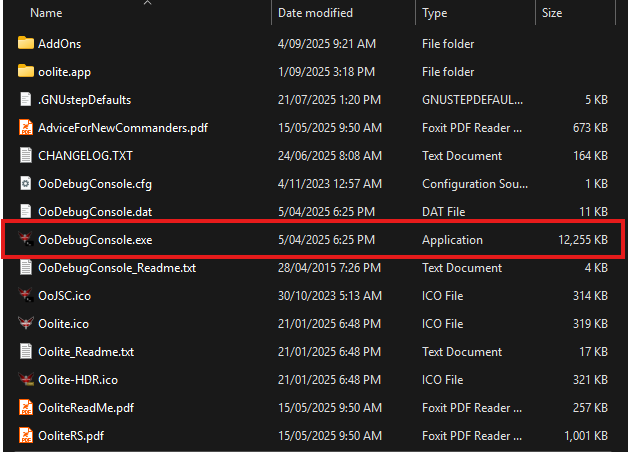
After you install it, you should see this executable in your Oolite folder:

Image

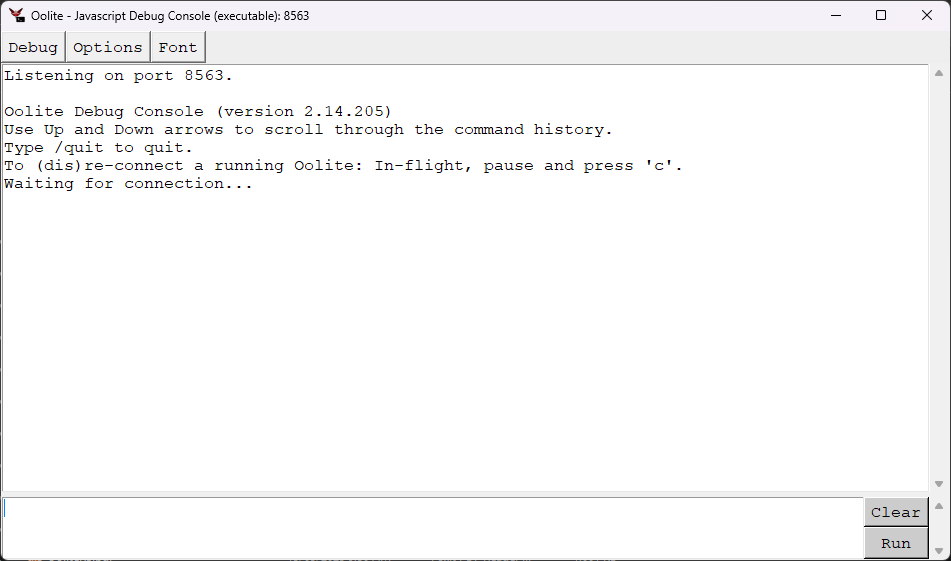
Run that *before* you start Oolite. It should look something like this:

Image

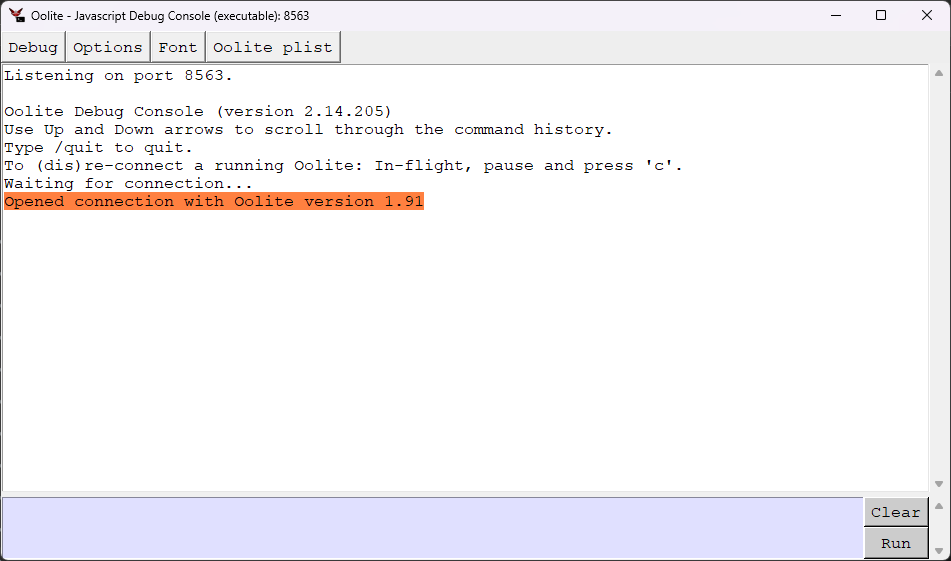
After you start Oolite, you should see this line in the window:

Image

The box at the bottom is where you can enter commands.

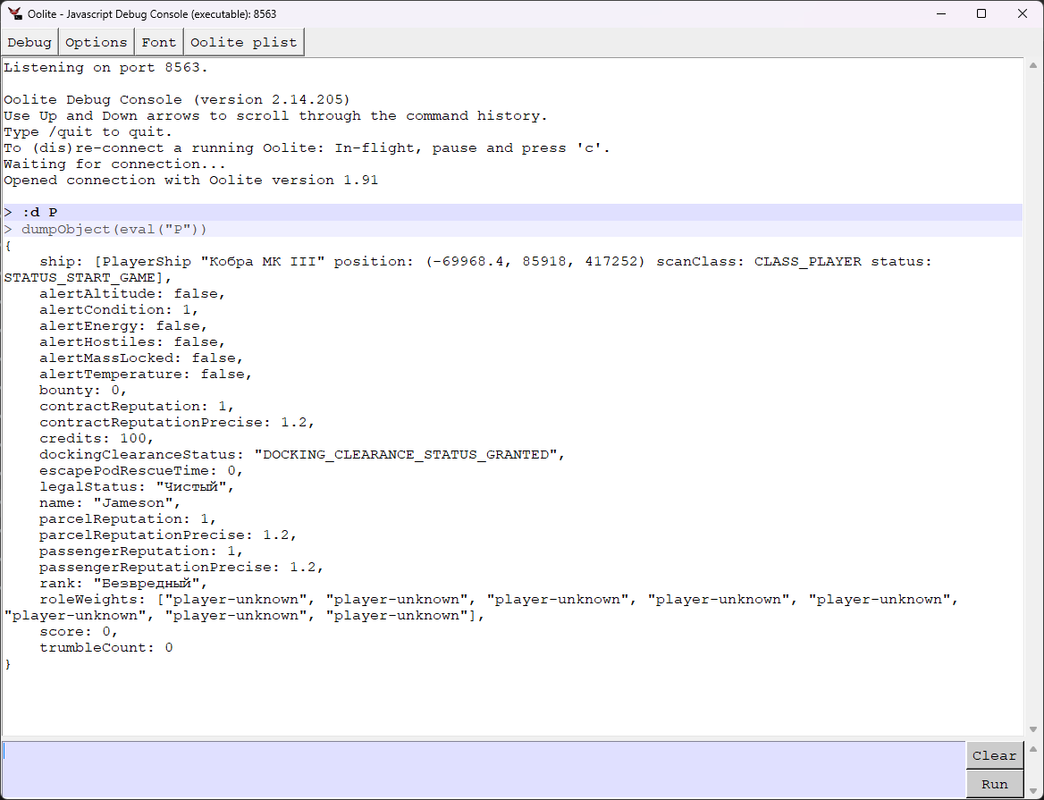
In this screenshot, I've entered the command ":d P", which is shorthand for "dump all the properties of the Player object"

Image

Anyway, in the meantime I'll check out the download you've provided and see what I can see.
User avatar
phkb
Impressively Grand Sub-Admiral
Posts: 5612
Joined: Tue Jan 21, 2014 10:37 pm
Location: Writing more OXPs, because the world needs more OXPs.

Re: Ore Processor - Custom Splinters.

Post by phkb »

Krager wrote: Tue Sep 02, 2025 8:33 am
Я думаю вам будет проще посмотреть, чем мне объяснять как это сделать. Присоединяю архив с дополнениями. Посмотрите пожалуйста что с Ore_processor не так.
I used your subset of OXP's, and gave myself a fuel scoop, a mining laser, and the Ore Processor and Ore Scanner. I launched from a Rock Hermit and using the debug console was able to spawn 10 asteroids around me using this command:

Code: Select all

S.addShips("asteroid", 10, PS.position, 20000)
I shot one of the asteroids with the mining laser until it split into boulders. I then shot a boulder to split it into splinters. I targeted one of the splinters, then primed the Ore Scanner and pressed the "b" mode key to scan the splinter. It said it detected alloys. I scooped the splinter and used the Ore Processor on it, and got 1t of alloys.

From everything I can see, this is working as it should.

My question, though, is why are you interested in the "Asteroids3D" OXP? The asteroids it uses (and by extension, the splinters that come from them) can't be processed by the Ore Scanner and Ore Processor. The Ore Processor will only process normal asteroids, and by that I mean asteroids that are created in the system when the system is generated. Is this the issue you are experiencing?
User avatar
Krager
---- E L I T E ----
---- E L I T E ----
Posts: 266
Joined: Wed Dec 11, 2024 9:44 pm
Location: Russian

Re: Ore Processor - Custom Splinters.

Post by Krager »

Мне написал человек, что Ore_processor не работает. Я решил проверить, и чтоб не лететь - искать астероиды, стал использовать `Asteroids3D` Буду знать что в нём астероиды отличаются от стандартных. Ещё использовал `Icesteroids` так ка так там астероиды появляются сразу рядом со станцией. Сейчас проверю более детально. Полечу искать обычные астероиды.
User avatar
Krager
---- E L I T E ----
---- E L I T E ----
Posts: 266
Joined: Wed Dec 11, 2024 9:44 pm
Location: Russian

Re: Ore Processor - Custom Splinters.

Post by Krager »

Проверил, обычные астероиды обрабатываются и сканируются. Из-за незнания что роли осколков в Asteroids3D отличаются, лишний раз побеспокоил. Благодарю вас за помощь!
Можете подсказать что надо изменить в Asteroids3D чтобы Таргоиды не появлялись?
Post Reply