External Docking System
Moderators: another_commander, winston

Re: External Docking System
https://oolite.space/#oxp the link to this OXP is broken. Should be Docking, not Dock.
-
phkb

- Impressively Grand Sub-Admiral

- Posts: 5639
- Joined: Tue Jan 21, 2014 10:37 pm
- Location: Writing more OXPs, because the world needs more OXPs.
Re: External Docking System
Um... When I click on both the info link and the download link, both are working. I'm not sure what I need to fix.
Re: External Docking System
The link on https://oolite.space/#oxp appears as External Dock System, which is a page that shows
Thought I was going mad(der) for a minute there.
Suggest External Docking System, which is Docking, not Dock, and goes to the page with stuff in it.There is currently no text in this page. You can search for this page title in other pages, or search the related logs, but you do not have permission to create this page.
Thought I was going mad(der) for a minute there.
-
phkb
- Impressively Grand Sub-Admiral
- Posts: 5639
- Joined: Tue Jan 21, 2014 10:37 pm
- Location: Writing more OXPs, because the world needs more OXPs.
Re: External Docking System
Ah! got it. Thanks!

Re: External Docking System
After installing ![[EliteWiki]](/images/elitewikismall.png) Auxiliary Pylon OXZ and the 60 TC pod from Cargo Pods OXZ my Dragon M can no longer use external docking on seedy spacebars from oolite.oxp.phkb.SpacebarFacelift.oxz .
Auxiliary Pylon OXZ and the 60 TC pod from Cargo Pods OXZ my Dragon M can no longer use external docking on seedy spacebars from oolite.oxp.phkb.SpacebarFacelift.oxz .
One time while flying very slow I was docked, but with every equipment device damaged and most of the cargo lost.
4 other times in 2 different systems the ship just exploded .
Instant docking on spacebar or main stations works fine, auto-docking shift+L with rock hermits also works.
Auxiliary Pylon OXZ and the 60 TC pod from Cargo Pods OXZ my Dragon M can no longer use external docking on seedy spacebars from oolite.oxp.phkb.SpacebarFacelift.oxz .One time while flying very slow I was docked, but with every equipment device damaged and most of the cargo lost.
4 other times in 2 different systems the ship just exploded .
Instant docking on spacebar or main stations works fine, auto-docking shift+L with rock hermits also works.
OS : Arch Linux 64-bit - rolling release
From: The Netherlands, Europe
OXPs : My user page (needs updating)
Retired, occasionally active
From: The Netherlands, Europe
OXPs : My user page (needs updating)
Retired, occasionally active
-
phkb
- Impressively Grand Sub-Admiral
- Posts: 5639
- Joined: Tue Jan 21, 2014 10:37 pm
- Location: Writing more OXPs, because the world needs more OXPs.
Re: External Docking System
I just docked successfully 5 different times at the external point while flying a Dragon M with an Aux Pylon and 60T cargo pod. So I'm unsure where the error currently is. Was there any info in the logs? Could you dock successfully at the external point *before* purchasing the Aux Pylon and cargo pod?
Re: External Docking System
Doublechecked and it's not the aux pylon or 60 TC cargo pod.
Used erbiti to test (it's seedy spacebar is very near the WP, so usually no pirates waiting for you).
The problem seems to be that the green target flasher is a bit to close to the spacebar.
You have to center the flasher and be very close to it before docking is activated.
Depending on the angle you approach it the top part of the flasher can be behind extrusions of the deck/spacebar .
This can lead to a crash before the docking procedure is activated.
Reproducing should be doable by changing the angle you approach on.
If part of the flasher is obscured by the spacebar/deck, crashing is very likely .
Moving the flasher a bit away from the spacebar and/or increasing the range where docking is activated seems like a good idea.
An alternative could be to allow activation inside a cube and draw that cube instead of a circle ?
That would make it much easier to see if your approach angle is usable.
Used erbiti to test (it's seedy spacebar is very near the WP, so usually no pirates waiting for you).
The problem seems to be that the green target flasher is a bit to close to the spacebar.
You have to center the flasher and be very close to it before docking is activated.
Depending on the angle you approach it the top part of the flasher can be behind extrusions of the deck/spacebar .
This can lead to a crash before the docking procedure is activated.
Reproducing should be doable by changing the angle you approach on.
If part of the flasher is obscured by the spacebar/deck, crashing is very likely .
Moving the flasher a bit away from the spacebar and/or increasing the range where docking is activated seems like a good idea.
An alternative could be to allow activation inside a cube and draw that cube instead of a circle ?
That would make it much easier to see if your approach angle is usable.
OS : Arch Linux 64-bit - rolling release
From: The Netherlands, Europe
OXPs : My user page (needs updating)
Retired, occasionally active
From: The Netherlands, Europe
OXPs : My user page (needs updating)
Retired, occasionally active
Re: External Docking System
Either/or. I'd given up trying to use external docking due to seemingly random fails. You may have hit the nail on the head there.Lone_Wolf wrote: ↑Sun Sep 28, 2025 1:42 pmMoving the flasher a bit away from the spacebar and/or increasing the range where docking is activated seems like a good idea.
An alternative could be to allow activation inside a cube and draw that cube instead of a circle ?
That would make it much easier to see if your approach angle is usable.
-
phkb
- Impressively Grand Sub-Admiral
- Posts: 5639
- Joined: Tue Jan 21, 2014 10:37 pm
- Location: Writing more OXPs, because the world needs more OXPs.
Re: External Docking System
I agree. Except that it's not doing it on my system!
I see two possibilities. 1: There is a conflict with another OXP that is adjusting the size or position of the space bar and/or the external docking point; or 2: There is a difference in rendering between Windows and Linux.
Can I get both of you to run this snippet in the debug console, and get a screenshot of the result?
Code: Select all
mission.runScreen({ title:"Spacebar test", model:"[random_hits_griff_spacebar]", spinModel:false});
var m = mission.displayModel;
m.orientation = [-0.0559469, 0.0500187, -0.705335, 0.70489];
m.position = [0, 0, 2881.48];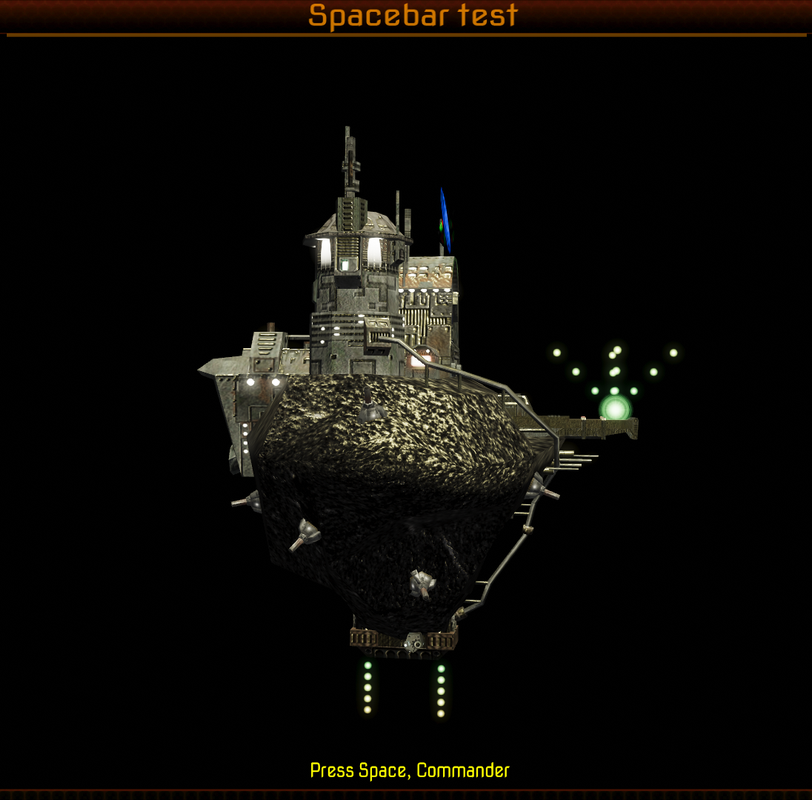
And here's the "clean" version:
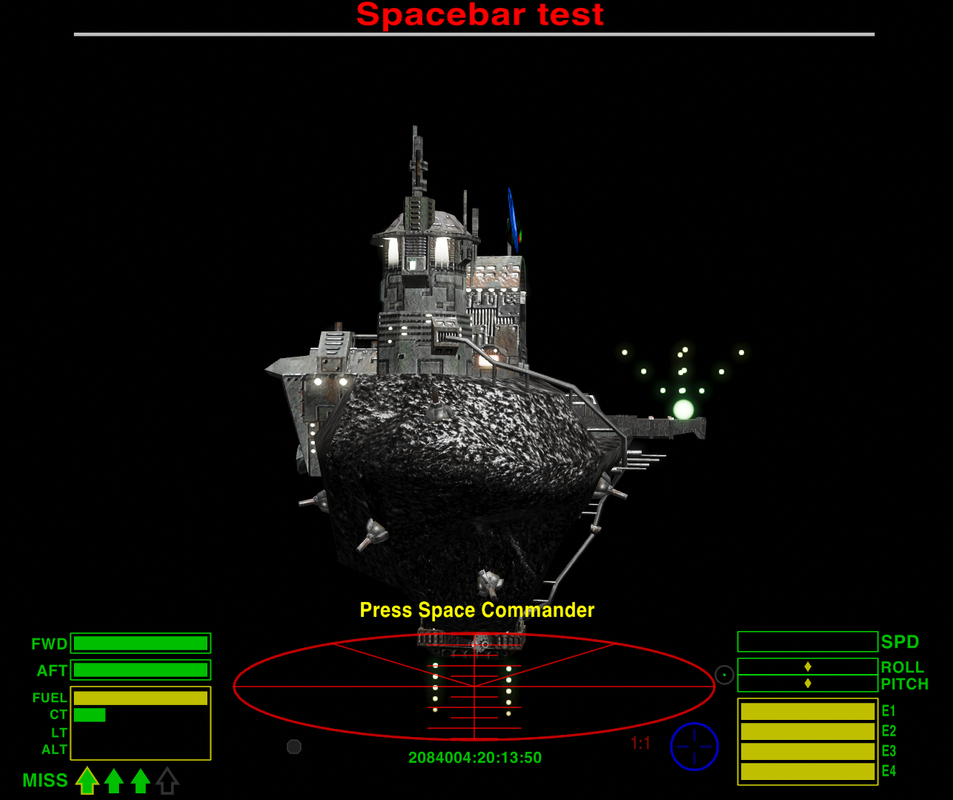
Notice that in both, the external docking point is well above the exterior platform.
If you could run the test with all your normal mods installed, and then run it again with only Random Hits, the facelift mod and the external docking system installed, hopefully we can get to the bottom of what's going on.
Because otherwise I'll have to withdraw the external docking system entirely.
-
Cholmondely

- Archivist

- Posts: 6579
- Joined: Tue Jul 07, 2020 11:00 am
- Location: The Delightful Domains of His Most Britannic Majesty (industrial? agricultural? mainly anything?)
- Contact:
Re: External Docking System
I've not had these problems on my AppleMac (running 200-300 OXPs) - not since the early days with the earlier versions and when I was landing on planets (PF2).
Comments wanted:
•Missing OXPs? What do you think is missing?
•Lore: The economics of ship building How many built for Aronar?
•Lore: The Space Traders Flight Training Manual: Cowell & MgRath Do you agree with Redspear?
•Missing OXPs? What do you think is missing?
•Lore: The economics of ship building How many built for Aronar?
•Lore: The Space Traders Flight Training Manual: Cowell & MgRath Do you agree with Redspear?
Re: External Docking System
That would require havingphkb wrote:Can I get both of you to run this snippet in the debug console, and get a screenshot of the result?
Basic-Debug OXZ for Oolite v1.83/84 installed as well as an external console ?Archlinux currently has python 3.13.7 and that had to be delayed several months after release because many applications that ran fine with python 3.12 needed changes for 3.13 .
Has https://github.com/OoliteProject/oolite ... /releases/ been tested with python 3.13 ?
OS : Arch Linux 64-bit - rolling release
From: The Netherlands, Europe
OXPs : My user page (needs updating)
Retired, occasionally active
From: The Netherlands, Europe
OXPs : My user page (needs updating)
Retired, occasionally active
-
phkb
- Impressively Grand Sub-Admiral
- Posts: 5639
- Joined: Tue Jan 21, 2014 10:37 pm
- Location: Writing more OXPs, because the world needs more OXPs.
Re: External Docking System
Hang on. I'll turn it into an OXP. Stand by.
-
phkb
- Impressively Grand Sub-Admiral
- Posts: 5639
- Joined: Tue Jan 21, 2014 10:37 pm
- Location: Writing more OXPs, because the world needs more OXPs.
Re: External Docking System
OK
Download TestSpaceBar.oxz and add to your AddOns folder.
When you start/load a game, you should find "Test Space Bar" as an option on the F4 Interfaces page.
Download TestSpaceBar.oxz and add to your AddOns folder.
When you start/load a game, you should find "Test Space Bar" as an option on the F4 Interfaces page.
Re: External Docking System
Looks very similar to your pic
https://postimg.cc/KkNs7kJt
However, this is what it looks ingame
https://postimg.cc/QKdYf8yk
Imagine flying towards it from an angle below the deck ...
EDIT : will do screenshot with minimal amount of mods tomorrow.
https://postimg.cc/KkNs7kJt
However, this is what it looks ingame
https://postimg.cc/QKdYf8yk
Imagine flying towards it from an angle below the deck ...
EDIT : will do screenshot with minimal amount of mods tomorrow.
OS : Arch Linux 64-bit - rolling release
From: The Netherlands, Europe
OXPs : My user page (needs updating)
Retired, occasionally active
From: The Netherlands, Europe
OXPs : My user page (needs updating)
Retired, occasionally active
-
phkb
- Impressively Grand Sub-Admiral
- Posts: 5639
- Joined: Tue Jan 21, 2014 10:37 pm
- Location: Writing more OXPs, because the world needs more OXPs.
Re: External Docking System
Which is how it is supposed to look in game.
You shouldn't be approaching from an angle *below* the deck. The smaller leading flashers are intended to give you an indication of which directions to approach from. You *must* be above the deck when you approach.