Page 2 of 2
Re: Rethinking Oolite game folders
Posted: Mon Dec 22, 2025 3:08 am
by Wildeblood
mcarans wrote: ↑Mon Dec 22, 2025 2:06 am
Another less pure but easier to find alternative is ~/Documents/Oolite (Linux, MacOS) or %USERPROFILE%\Documents\Oolite (Windows) instead of ~/.local/share/Oolite. According to AI, this is "The 'User-Friendly' Standard (Most Common)...Most games place addons in the Documents folder because it is the easiest place for non-technical users to find without enabling 'Hidden Files.'"
No! In "Documents" is the last place you want it. On this Windows 10 machine, there is a folder called "Saved Games" alongside the Documents, Music, Videos, etc folders. I don't know whether that arrangement persists in Windows 11.
Re: Rethinking Oolite game folders
Posted: Mon Dec 22, 2025 4:59 am
by mcarans
Wildeblood wrote: ↑Mon Dec 22, 2025 3:08 am
mcarans wrote: ↑Mon Dec 22, 2025 2:06 am
Another less pure but easier to find alternative is ~/Documents/Oolite (Linux, MacOS) or %USERPROFILE%\Documents\Oolite (Windows) instead of ~/.local/share/Oolite. According to AI, this is "The 'User-Friendly' Standard (Most Common)...Most games place addons in the Documents folder because it is the easiest place for non-technical users to find without enabling 'Hidden Files.'"
No! In "Documents" is the last place you want it. On this Windows 10 machine, there is a folder called "Saved Games" alongside the Documents, Music, Videos, etc folders. I don't know whether that arrangement persists in Windows 11.
AI says "You can safely use the Saved Games folder for snapshots, logs, and addons. It is a stable, user-writable directory that is generally safe from Windows updates and cloud-sync interference" although it warns against very large temporary or cache files going in there for games on the Microsoft Store. It gave the example of the game Digital Combat Simulator which uses the Saved Games folder
for all sorts of stuff like configuration not just saved games. Another example is Doom Eternal from the Xbox App or Microsoft Store, which AI says creates a folder structure here:
C:\Users\YourName\Saved Games\id Software\DOOMEternal\ in which it stores config and user profile info. Oolite on Windows could also use it like that instead of
%LOCALAPPDATA%\ or could use a combination of the two. What are Windows users thoughts on that?
Re: Rethinking Oolite game folders
Posted: Mon Dec 22, 2025 5:36 am
by another_commander
For me oolite-saves and subfolders under user/Saved Games/Oolite and GNUstep + Logs + AddOns and subfolders under localappdata/Oolite seems the most logical way to go about it.
Re: Rethinking Oolite game folders
Posted: Mon Dec 22, 2025 7:52 am
by another_commander
I experimented a bit with moving folders over to %LOCALAPPDATA% etc. It seemed to be quite easy.
For everything generated by Oolite (Logs, GNUstepDefaults, Library folder, oolite-saves and snapshots) all one has to do is change this line in main.m:
Code: Select all
SETENVVAR("HOMEPATH", currentWorkingDir);
to
Code: Select all
SETENVVAR("HOMEPATH", strcat(SDL_getenv("LOCALAPPDATA"), "\\Oolite\\oolite.app"));
For the location of the AddOns folder, the only change necessary seems to be in OOOXZManager.m gameDirAddOnsPath method:
to
Code: Select all
return [NSString stringWithFormat:@"%s\\Oolite\\AddOns", SDL_getenv("LOCALAPPDATA")];
We may still need to adjust the NSIS installer script to generate the AddOns folder in the right place when the Test Release builds are made.
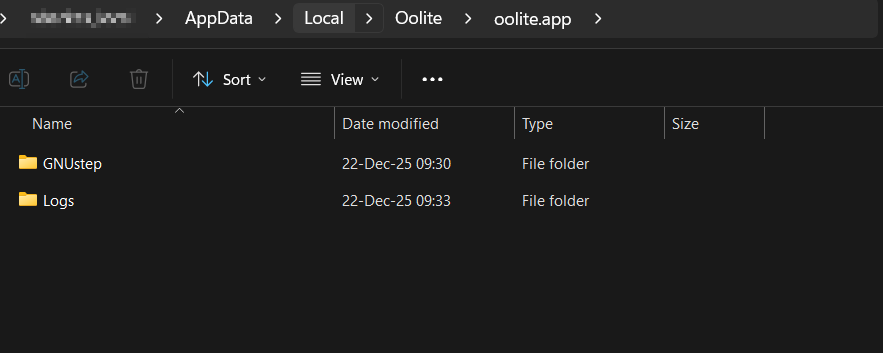
Although this configuration is slightly different to the one I proposed above, if it is decided to go with LOCALAPPDATA folders, I would prefer this as it is apparently the simplest.
Re: Rethinking Oolite game folders
Posted: Mon Dec 22, 2025 7:57 am
by mcarans
another_commander wrote: ↑Mon Dec 22, 2025 5:36 am
For me oolite-saves and subfolders under user/Saved Games/Oolite and GNUstep + Logs + AddOns and subfolders under localappdata/Oolite seems the most logical way to go about it.
Also the GNUstep folder could be moved under localappdata next to the Oolite folder or is it better in the localappdata/Oolite folder or can it stay in the installation folder and still work with Ms Store?
Re: Rethinking Oolite game folders
Posted: Mon Dec 22, 2025 8:06 am
by another_commander
mcarans wrote: ↑Mon Dec 22, 2025 7:57 am
Also the GNUstep folder could be moved under localappdata next to the Oolite folder or is it better in the localappdata/Oolite folder or can it stay in the installation folder and still work with Ms Store?
The game does not need any changes to work with the store. The MSIX configures it to send all its data to a virtualized system inside %LOCALAPPDATA%/Packages. It's just that this virtual filesystem is quite deep in LocalAppData and it's simpler for users if those generated folders are farmed out to %LOCALAPPDATA%/Oolite as mentioned in my previous message.
Re: Rethinking Oolite game folders
Posted: Mon Dec 22, 2025 6:45 pm
by mcarans
another_commander wrote: ↑Mon Dec 22, 2025 8:06 am
mcarans wrote: ↑Mon Dec 22, 2025 7:57 am
Also the GNUstep folder could be moved under localappdata next to the Oolite folder or is it better in the localappdata/Oolite folder or can it stay in the installation folder and still work with Ms Store?
The game does not need any changes to work with the store. The MSIX configures it to send all its data to a virtualized system inside %LOCALAPPDATA%/Packages. It's just that this virtual filesystem is quite deep in LocalAppData and it's simpler for users if those generated folders are farmed out to %LOCALAPPDATA%/Oolite as mentioned in my previous message.
That's very similar to Flatpak which puts them in
~/.var/app/org.OoliteProject.oolite
Re: Rethinking Oolite game folders
Posted: Mon Dec 22, 2025 9:14 pm
by another_commander
I have committed the code to transfer game data out to %localappdata% on Windows. The code is currently dormant and can be activated by defining the macro OO_GAME_DATA_TO_USER_FOLDER to 1.
With this, the AddOns folder is transferred under %localappdata%/Oolite, while GNUstep, Logs, oolite-saves and oolite-saves/snapshots are all transferred under %localappdata%/Oolite/oolite.app. This way the folder structure remains familiar and should not confuse anyone. First tests show good results.
Re: Rethinking Oolite game folders
Posted: Tue Dec 23, 2025 9:35 pm
by mcarans
another_commander wrote: ↑Mon Dec 22, 2025 9:14 pm
I have committed the code to transfer game data out to %localappdata% on Windows. The code is currently dormant and can be activated by defining the macro OO_GAME_DATA_TO_USER_FOLDER to 1.
With this, the AddOns folder is transferred under %localappdata%/Oolite, while GNUstep, Logs, oolite-saves and oolite-saves/snapshots are all transferred under %localappdata%/Oolite/oolite.app. This way the folder structure remains familiar and should not confuse anyone. First tests show good results.
I think that it would be useful to have the behaviour switch based on one or more environment variables - that way it can be chosen when running the game whether to use game or user folders for GNUstep, Logs, oolite-saves and oolite-saves/snapshots. For AddOns, it probably makes sense to check both game and user folders.
What do you think about the idea of there being one default path in the code for each of GNUstep, Logs, oolite-saves and oolite-saves/snapshot with the ability to override that default path with an environment variable? That way instead of having lots of logic in the code to switch for different setups such as flatpak, MSIX, appimage, NSIS, source build etc., the environment variables can just be configured in pre-launch scripts that fill them according to build type if not set already by the user before running the game eg. something like this for snapshots:
Code: Select all
const char *snapshotEnv = SDL_getenv("OO_SNAPSHOTS");

if (snapshotEnv)
{
	NSString *savedir = [NSString stringWithUTF8String:snapshotEnv];
}
else
{
	NSString *savedir = [[NSHomeDirectory() stringByAppendingPathComponent:@SAVEDIR] stringByAppendingPathComponent:@SNAPSHOTDIR];
}
For AddOns, there could be multiple default paths, but we could allow an environment variable OO_ADDONS that can specify one or more additional locations.
The reason I'm thinking about making this so configurable is to be able to seamlessly support the current folder layouts for existing players who would prefer to keep folders similar to how things are, while allowing newer cleaned up standardised folder layouts for new players (who may find current layouts confusing or inconvenient) and those who wish to migrate without complicating the code with rules for different layouts and build types.
Also this would allow advanced users to come up with customised locations to suit multiple game installations etc. It would be useful to Oolite tool makers who could set these environment variables rather than having to copy files in and out of folders and/or rename them for multiple configuration setups. OoliteStarter would be a great candidate for using the environment variables I would imagine. It might be useful to have an environment variable for the location of managed addons to support OoliteStarter and other future tools.
Re: Rethinking Oolite game folders
Posted: Sun Jan 04, 2026 6:46 pm
by mcarans
In this PR, I've made all folders configurable by environment variable:
https://github.com/OoliteProject/oolite/pull/536
On Linux, these environment variables are set in a script before running Oolite:
export OO_SAVEDIR="${OO_SAVEDIR:-${GAME_DATA}/SavedGames}"
export OO_SNAPSHOTSDIR="${OO_SNAPSHOTSDIR:-${GAME_DATA}/Snapshots}"
export OO_LOGSDIR="${OO_LOGSDIR:-${GAME_DATA}/.logs}"
export OO_MANAGEDADDONSDIR="${OO_MANAGEDADDONSDIR:-${GAME_DATA}/.ManagedAddOns}"
export OO_ADDONSEXTRACTDIR="${OO_ADDONSEXTRACTDIR:-${GAME_DATA}/AddOns}"
OO_GNUSTEPDIR="${OO_GNUSTEPDIR:-${GAME_DATA}/.GNUstep}"
OO_GNUSTEPDEFAULTSDIR="${OO_GNUSTEPDEFAULTSDIR:-${GAME_DATA}}"
All these can be overridden by the user setting these variables before running the AppImage. OO_ADDONSEXTRACTDIR is where managed addons will be extracted to.
OO_DIRTYPE is usually unset. In this case, the setup will be portable ie. use current folder/GameData/ for Oolite folders.
If the user sets OO_DIRTYPE to legacy, the old folders will be used (~/.Oolite ~/saved-games ~/GNUstep etc.)
If the user sets OO_DIRTYPE to xdg, ~/.local/share is used with new folder names like SavedGames, .ManagedAddons etc.
OO_ADDITIONALADDONSDIRS can be set by the user to pass a comma separated list of additional OXP folders.
These variables could also be used by Windows but are not currently.