Edit: This is modern Clang build.
Edit2: The latest installation should use
C:\Users\mcara\AppData\Local\Packages\Oolite_gaxdj102ck5vt\LocalCache\Local\Oolite for user files.Moderators: another_commander, winston

C:\Users\mcara\AppData\Local\Packages\Oolite_gaxdj102ck5vt\LocalCache\Local\Oolite for user files.I had used the old one. The new one worked for me too. This time as well as the other tests, I took a snapshot which ended up in:another_commander wrote: ↑Sat Dec 27, 2025 8:49 pmGreat, but it appears that you tested the original MSIX I created, not the latest one. Did the file you downloaded end in _LOCALAPPDATA.msix? If not, please try with this installer linked to in my last message, namely https://drive.google.com/file/d/1WA06PB ... sp=sharing
Edit: This is modern Clang build.
C:\Users\mcara\AppData\Local\Packages\Oolite_gaxdj102ck5vt\LocalCache\Local\Oolite\oolite.app\oolite-saves\snapshots%localappdata%\Packages\Oolite_(package generated key here)\LocalCache\Local\Oolite. From that point on it will use that foder. This means that, when uninstalled, the app will leave the contents of %localappdata%\Oolite behind.Get-AppxPackage -name oolite. You will get back a response similar to this: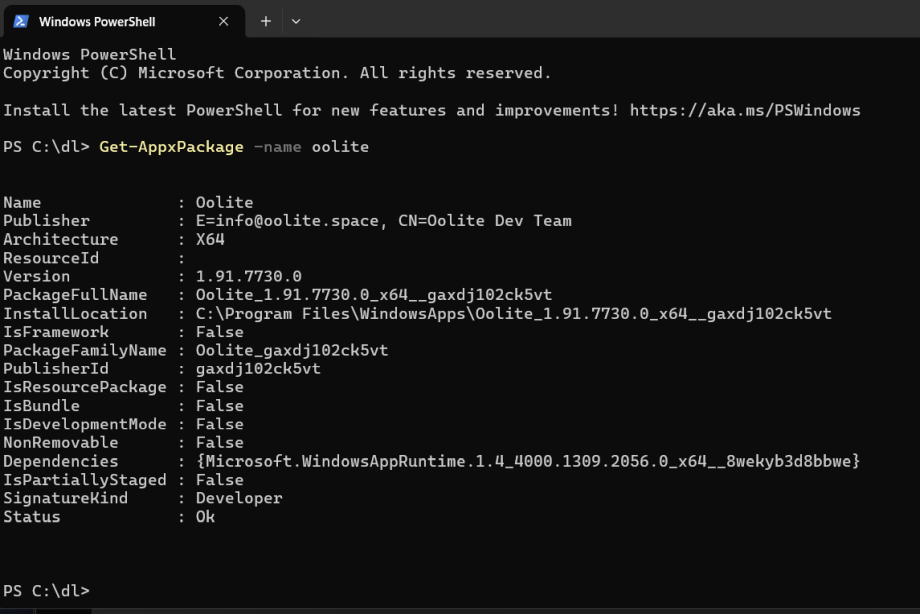
C:\Program Files\WindowsApps\Oolite_1.91.7730.0_x64__gaxdj102ck5vt.C:\Program Files\WindowsApps\Oolite_1.91.7730.0_x64__gaxdj102ck5vt\VFS\AppVPackageDrive\Oolite\oolite.app\oolite.exe to run the game, you will get access denied errors. The game must be launched either from the Start menu shortcuts or using the app execution alias "oolite", which can be executed from any place you like.VFS\AppVPackageDrive\Oolite inside this zip file. Drag the folder anywhere you want and done. You now have Oolite installed the old way, in the folder of your preference, fully editable like before. Note that one of the game's files, libstdc++-6.dll, may be unzippped as libstdc%28%28%-6.dll and this will result in the game not starting. If this happens, just replace the two instances of %28% in the filename with "++" and it's fixed.

Might it be possible to include the relevant chunks of all this for the installation/deinstallation screens for this version of Oolite - perhaps with mention of a backup copy in the ReadMe?another_commander wrote: ↑Sun Dec 28, 2025 11:39 amHere are a few factoids after some further research on the behaviour of MSIX installers.
1. If you are not content with the whole package-inside-shielded-container philosophy and would like to have the game's generated files not automatically deleted during uninstall (which could be understandable for a game like Oolite and all the OXPs one can download), it is possible to bypass the package's virtualization but you will have to help it a bit:
All you have to do is manually create a folder named "Oolite" under %localappdata% before running the game for the first time. When the package sees that a folder of that name already exists in the local appdata folder, it redirects all its output to that folder intead of the container located in%localappdata%\Packages\Oolite_(package generated key here)\LocalCache\Local\Oolite. From that point on it will use that foder. This means that, when uninstalled, the app will leave the contents of%localappdata%\Oolitebehind.
2. It is after all possible to view the contents of the sandbox installation folder under the forbidden WindowsApps folder. You can view and copy the contents of the folder elsewhere, but you cannot write to it. There are two ways to get to the sandbox:You can now directly view the installation files - no changes are allowed inside the folder though. Also, it is not possible to just type the full path to the executable
- You can open a command line console and just cd to the folder. You need to know the full path though. To get the full path, open a powershell window and execute the command
Get-AppxPackage -name oolite. You will get back a response similar to this:
The InstallLocation property is what we want. In this example, it isC:\Program Files\WindowsApps\Oolite_1.91.7730.0_x64__gaxdj102ck5vt.- The second method to get to the forbidden folder is to run Oolite and open Task Manager as the game is running. Find the oolite.exe process in the Task Manager's Details tab, right click on it and select "Open file location" from the context menu. An Explorer window will open in the location of the game's installation.
C:\Program Files\WindowsApps\Oolite_1.91.7730.0_x64__gaxdj102ck5vt\VFS\AppVPackageDrive\Oolite\oolite.app\oolite.exeto run the game, you will get access denied errors. The game must be launched either from the Start menu shortcuts or using the app execution alias "oolite", which can be executed from any place you like.
3. The MSIX is just a glorified zip file. If you don't want to install the game as a sandbox you can always rename the .msix to .zip and open it with your favorite zip file manager. The game files are located inVFS\AppVPackageDrive\Ooliteinside this zip file. Drag the folder anywhere you want and done. You now have Oolite installed the old way, in the folder of your preference, fully editable like before. Note that one of the game's files, libstdc++-6.dll, may be unzippped as libstdc%28%28%-6.dll and this will result in the game not starting. If this happens, just replace the two instances of %28% in the filename with "++" and it's fixed.
We could certainly update the ReadMe with the most relevant information about the new installer, but the thing is that the new installer does not install documentation files to an accessible path at this time. I am not sure if it can be done with the MISX format but if it is possible and we can end up including docs in the installation that the user can actually see, we can look into it.Cholmondely wrote: ↑Sun Dec 28, 2025 11:59 amMight it be possible to include the relevant chunks of all this for the installation/deinstallation screens for this version of Oolite - perhaps with mention of a backup copy in the ReadMe?
I have been thinking that the easiest solution for documentation is for it all to be online - it would be simpler to keep it up to date and have multiple people maintain it. The Oolite wiki would be one obvious place for it. Another is a GitHub wiki or even just a GitHub repo with markdown files would work. The appropriate link to documentation would need to be clear at the point of download.another_commander wrote: ↑Sun Dec 28, 2025 12:55 pmWe could certainly update the ReadMe with the most relevant information about the new installer, but the thing is that the new installer does not install documentation files to an accessible path at this time. I am not sure if it can be done with the MISX format but if it is possible and we can end up including docs in the installation that the user can actually see, we can look into it.Cholmondely wrote: ↑Sun Dec 28, 2025 11:59 amMight it be possible to include the relevant chunks of all this for the installation/deinstallation screens for this version of Oolite - perhaps with mention of a backup copy in the ReadMe?
I had been thinking online as well. Somewhere on oolite.space would be fine.mcarans wrote: ↑Mon Dec 29, 2025 2:12 am
I have been thinking that the easiest solution for documentation is for it all to be online - it would be simpler to keep it up to date and have multiple people maintain it. The Oolite wiki would be one obvious place for it. Another is a GitHub wiki or even just a GitHub repo with markdown files would work. The appropriate link to documentation would need to be clear at the point of download.



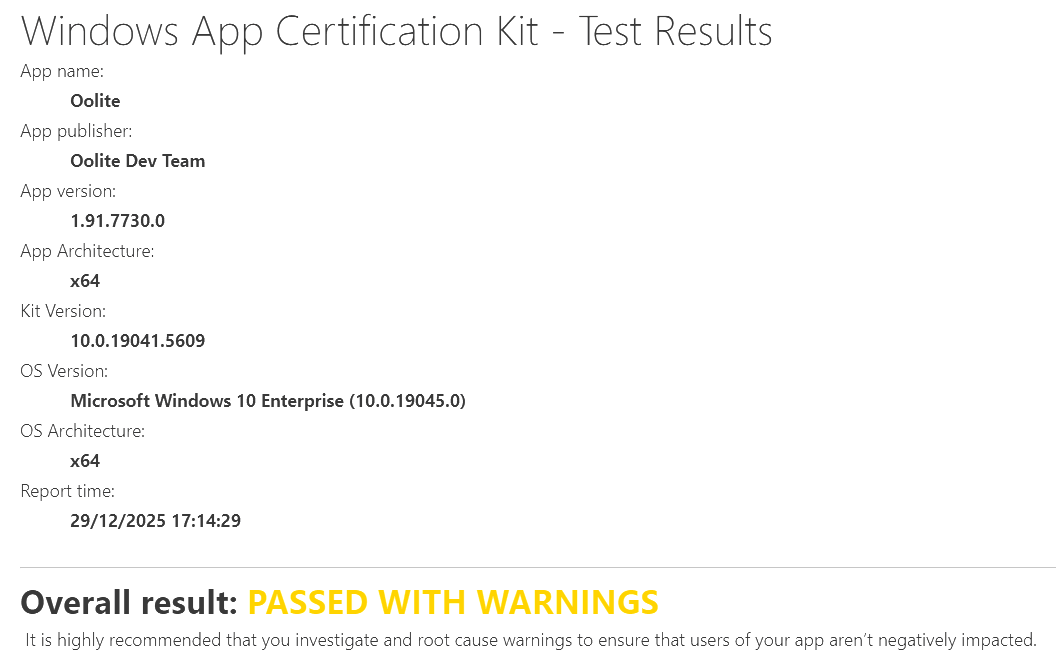
That's great! Could the switch to HDR occur within Oolite itself eg. could it attempt to detect HDR on startup and if so, use it, or have a key combo in the game to switch between SDR and HDR?another_commander wrote: ↑Mon Dec 29, 2025 4:57 pmOne of Microsoft's recommendations for those submitting apps to the MS Store is that they run a set of verification tests on them to ensure compliance with the store rules and policies. These tests are effectively what MS checks during their application certification process prior to approving a release.
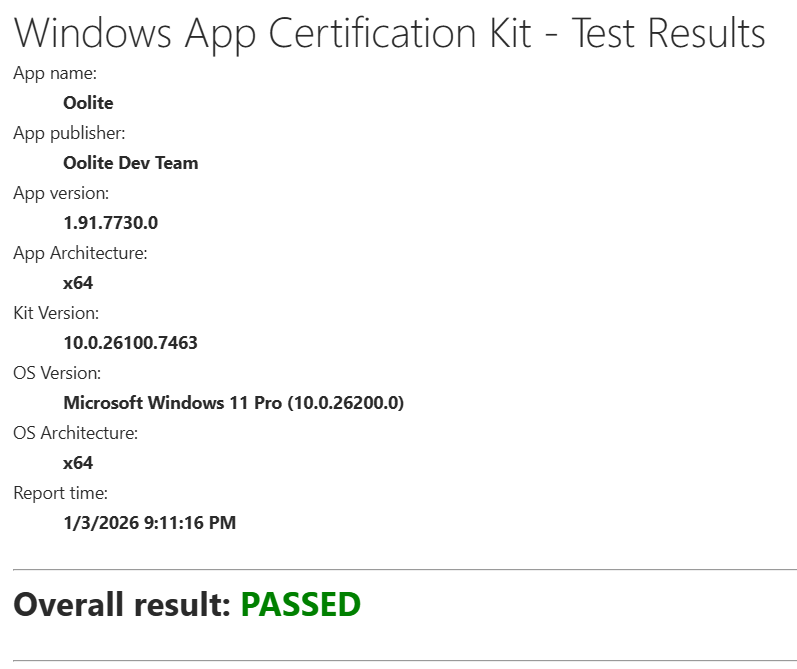
So, being a lawful and compliant MSslavecitizen, I run the latest MSIX through this test harness and I think the final result is quite good for a first attempt. The overall mark is "Passed with Warnings", the full results are uploaded as an html file at https://drive.google.com/file/d/13LJnCX ... sp=sharing and almost all of the warnings can be resolved by a simple explanation when submitting to the store in the text fields provided exactly for this reason. But let's go through the test findings and what we can do to rectify them:
The first warning is about DPI awareness:
This warning is bogus. Instead of testing oolite.exe, the test was exercised on PsfLauncher64.exe, which is the exe wrapper inserted in the package to launch the application when cmdline args are required and also for enabling first-run execution actions. Oolite is, of course, totally DPI awarre and has been for many years.
The second one is more serious and requires action from us, as it directly violates an MS Store rule:
The package indeed contains definitions for two applications, but there is a catch: both applications refer to the same executable, but one of them (Oolite-HDR) is run with the -hdr parameter. If this cannot be acceptable then we will have to remove Oolite-HDR as a shortcut from the game (which is something I'd hate to do but whatever, since the game can still be launched with any cmdline argument from any console or the Run Dialog).
Edit: I just noticed that this was part of the optional tests which, according to the header text in the report, do not count for MS Store onboarding. Maybe we can get away with it but I admit I feel a bit confused now...
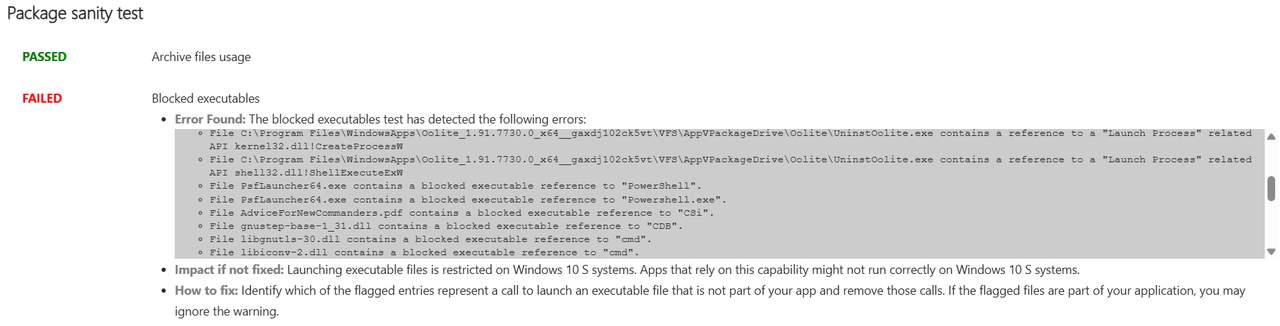
Finally there is this one:
This warning/error is relevant only if we care to support Windows S (a stripped down version of Windows with lots of limitations which (I think) runs on ARM computers). There is no issue with any of the files reported, with the exception of UninstOolite.exe, which is a remnant of the original uninstaller and was accidentally included in the package. It can easily be removed to fix this. The warning can be resolved simply by specifically stating during submission that Windows 10 S is NOT supported by Oolite.
And that's it! All other tests passed on the first go. Not bad
I'm very familiar with that one. I use it for my work eg. https://hdx-python-api.readthedocs.io/en/latest/Lone_Wolf wrote: ↑Mon Dec 29, 2025 1:55 pmMany opensource projects seem to use readthedocs.io , maybe using that would reduce the amount of work/serverload ?
https://en.wikipedia.org/wiki/Read_the_Docs